library(httr)
library(jsonlite)

prompt <- paste(
  "Summarize the following open-ended survey responses:",
  "..."
)

response <- POST(
  url = "http://localhost:1234/v1/completions",
  body = toJSON(
    list(prompt = prompt, max_tokens = 200),
    auto_unbox = TRUE
  ),
  encode = "json"
)
content(response)Local LLMs for Text
9.1 Overview
Cloud-based AI tools are often effective for coding and analysis, but they may be difficult to use in projects involving sensitive educational data. In many settings, researchers must address institutional and regulatory requirements before sending text to external services. Local LLM workflows provide an alternative path: analysis remains on the researcher’s own machine while preserving the benefits of model-assisted interpretation.
In this chapter, we introduce LM Studio as a practical interface for running local models and connecting them to R-based research workflows.
9.2 What is a Local LLM?
A local LLM is a large language model that runs on local hardware rather than a remote provider API. In this setup, prompts, documents, and outputs can remain within the local environment.
Why would you want this?
When working with student responses, interview transcripts, or institutional policy text, privacy is often a core requirement rather than a preference.
Many local setups use open-weight model families such as Llama (Meta), Qwen (Alibaba Cloud), DeepSeek (DeepSeek), and Mistral (Mistral AI). These are model lineages with multiple size variants (for example, smaller models for faster local inference and larger models for richer reasoning), allowing researchers to balance speed, quality, and hardware limits.
Key advantages of local LLMs:
- Privacy by design — your data never leaves your computer
- No API key hassles — no need to sign up for external services
- Totally offline — work without an internet connection
- Free to use — open-source models mean no per-token costs
9.3 What Can Local LLMs Do in Educational Research?
In practice, local models can support several common research tasks:
- Text analysis at scale — summarize, paraphrase, or dig into themes in open-ended survey responses, interview transcripts, or focus group data
- Theme extraction — have the LLM identify key patterns in your qualitative data without manually coding everything
- Report drafting — generate first drafts of findings sections or analytic memos
- Document Q&A — chat with your PDFs (“wait, what did participant #15 actually say about their learning experience?”)
- Integration with your existing workflow — connect local LLMs to R, Python, or other tools you already use
All of these tasks can be executed locally when the model and serving environment are configured on the researcher’s machine.
9.4 LM Studio as a Local Model Environment
LM Studio provides a practical interface for downloading, managing, and serving local models.
Core capabilities of LM Studio include:
- Cross-platform — works on Mac, Windows, and Linux
- User-friendly — no command-line setup required for standard use
- Model variety — choose from Llama, Qwen, DeepSeek, Mistral, and many others
- API ready — can serve models via a simple API for integration with R, Python, or other tools
- Chat with Documents — upload PDFs and query them entirely offline
Key points:
- Supported platforms: macOS (Apple Silicon), Windows (x64/ARM64), and Linux (x64)
- System requirements: for best results, review System Requirements for recommended RAM, CPU/GPU, and storage
9.4.1 Getting LM Studio Up and Running
Setup is usually straightforward:
- Grab LM Studio from lmstudio.ai/download — pick the version for your operating system
- Install and open it — just like any other app
- Download a model — LM Studio makes it simple to browse and download popular models (Llama 3, Qwen, Mistral, etc.)
- Run a quick test prompt — verify that the model responds before integrating with R
9.4.2 Connecting LM Studio to R
LM Studio exposes an OpenAI-compatible API, so R code can call a local model endpoint with a familiar request pattern.
Here is a simple example:
9.4.3 At a Glance: LM Studio Capabilities
| Feature | What It Means for You |
|---|---|
| Local LLMs | Run powerful AI models on your own machine—no internet needed |
| Chat Interface | Easy, intuitive way to interact with your model |
| Document Chat (RAG) | “Chat with your PDFs” while staying fully offline |
| Model Management | Download and organize different models easily |
| API Access | Connect to R, Python, or other tools you already use |
| MCP Integration | Advanced features for power users |
| Community & Support | Helpful Discord community and solid documentation |
9.5 Putting It All Together: A Real Example
This section demonstrates a local LLM workflow using the same university AI policy corpus introduced in Chapter 4. Here, the emphasis is thematic analysis with a locally served model.
9.5.1 Research Question
This section focuses on a single research question:
- What are the key themes in university AI policy statements?
By using the same dataset from Chapter 4, we can compare local-LLM thematic outputs with conventional text-analysis baselines.
9.5.2 The Data We Are Working With
We will reuse the AI policy statements dataset from Section 2—just the text content this time, stripped of institution names for that extra layer of privacy. Each record has a single field:
Stance(character): the actual policy text
We will pull out that Stance field so our results are directly comparable to what we got in Section 2.
library(dplyr)
library(stringr)
library(readr)

# Use 'university_policies' if it already exists.
# Otherwise, read the same CSV used in Section 2.
if (!exists("university_policies")) {
  university_policies <- read_csv(
    "data/University_GenAI_Policy_Stance.csv",
    show_col_types = FALSE
  )
}

stopifnot("Stance" %in% names(university_policies))

policy_texts <- university_policies$Stance %>%
  as.character() %>%
  stringr::str_squish() %>%
  na.omit()

length(policy_texts)
[1] 99policy_preview <- head(policy_texts, 3) %>%
str_trunc(width = 48)
preview_lines <- paste0(
seq_along(policy_preview),
". ",
policy_preview
)
cat(preview_lines, sep = "\n")1. If the text generated by ChatGPT is used as a...
2. Has ASU considered a ban on AI tools like oth...
3. The following sample statements should be tak...9.5.3 Time to Let the Local LLM Do Its Thing
We are going to send our policy texts to the local model running in LM Studio. The setup is straightforward—you will need your api_base and model_name ready to go (we are using openai/gpt-oss-20b in this example, but you can swap in whatever model you prefer).
library(httr)
library(jsonlite)
library(glue)
library(stringr)

# Use the connection parameters defined earlier.
api_base <- "http://127.0.0.1:1234/v1"
model_name <- "openai/gpt-oss-20b"
Testing the Local Connection
Before running large jobs, it is good practice to confirm that LM Studio is responding correctly. A quick “ping test” helps prevent silent connection errors.
library(httr)
library(jsonlite)

api_base <- "http://127.0.0.1:1234/v1"
model_name <- "openai/gpt-oss-20b"

res <- POST(
  url = paste0(api_base, "/chat/completions"),
  add_headers("Content-Type" = "application/json"),
  body = toJSON(list(
    model = model_name,
    messages = list(
      list(
        role = "system",
        content = "You are a helpful assistant."
      ),
      list(
        role = "user",
        content = "Please reply with 'pong'"
      )
    )
  ), auto_unbox = TRUE)
)

cat(content(res)$choices[[1]]$message$content)
If the model replies with “pong,” you are good to go!
Prompt writing
Next, we write the prompt template. Because our goal is thematic pattern detection in policy documents, the prompt requests structured outputs rather than a free-form narrative. This is important: prompt design can require the model to return table-ready fields that are easier to validate and compare.
# ----- 1) Prompt template -----
table_header <- paste0(
  "| Theme | Description | Illustrative Example(s) | ",
  "Frequency | Relative Frequency |"
)
theme_row_1 <- paste0(
  "| [Theme 1] | [Description] | - \\\"[Quote]\\\" | ",
  "[n] | [p]% |"
)
theme_row_2 <- paste0(
  "| [Theme 2] | [Description] | - \\\"[Quote]\\\" | ",
  "[n] | [p]% |"
)
prompt_instructions <- "
You are analyzing official university AI policy
statements.
Your task is to identify 3–5 key themes across
the statements
and report them in the exact format below.
**INPUT DATA:**
- **Number of Statements:** {n_items}
- **Policy Statements:**
{items}
**YOUR TASK:**
1) Identify 3–5 key themes across the policy statements.
2) For each theme:
a) Provide a concise theme name.
b) Provide a 1–2 sentence description.
c) Provide one short verbatim example quote.
d) Provide an integer Frequency
(count of statements mentioning it).
e) Provide Relative Frequency as a whole-number
percentage.
3) Write a 3–5 sentence **Summary of Responses**
synthesizing
the most important insights.
"prompt_output_format <- "
4) Output strictly in the following format:
**Summary of Responses**
[3–5 sentence narrative summary goes here.]
**Thematic Table**
{table_header}
|---|---|---|---|---|
{theme_row_1}
{theme_row_2}
"
analysis_prompt_template <- paste(
prompt_instructions,
prompt_output_format,
sep = "\n"
)Chunks!
Next, we define chunk sizes for the local LLM to analyze our data. In qualitative text analysis using LLMs (such as thematic synthesis or coding), chunk size refers to the amount of text you pass to the model at one time. It directly affects coherence, depth, and efficiency of analysis.
Chunk size balances context preservation and analytic precision in qualitative LLM-based text analysis. If chunks are too small, the model loses semantic coherence, producing fragmented or repetitive themes. If too large, it may miss local nuances or exceed the model’s reasoning capacity. The aim is to maintain enough continuity for meaningful interpretation while staying within manageable input limits.
Practically, chunk size should follow natural meaning units, such as paragraphs, speaker turns, or short sections, rather than fixed word counts. Researchers typically find that 500–1000 words work well for transcripts, while longer documents like policies can be chunked at 1000-1500 words. The guiding principle is to choose the smallest segment that preserves interpretive coherence.
A good rule of thumb: for policy documents, chunks of 10-20 items tend to work well. That gives the model enough context to find meaningful patterns without overwhelming it.
# ----- 2) Chunk the corpus -----
CHUNK_SIZE <- 15
chunk_ids <- ceiling(seq_along(policy_texts) / CHUNK_SIZE)
chunks <- split(policy_texts, chunk_ids)
Connecting to LM Studio
Once our data is prepared, our next step is to pass it to LM Studio. Using our function below, we send our text data to LM Studio server.
We specify the model name, a “system” role defining the model’s expertise (in this case, qualitative research analyst), and a “user” role containing the analysis prompt. Setting temperature = 0.2 reduces sampling randomness, while max_tokens limits the generated response.
Temperature controls sampling randomness. A low value (0.2) reduces variation, but repeated runs can still differ. Higher values allow more varied responses.
Max tokens sets an output-token budget. With a budget of 1000, a response may still end before a table or explanation is complete, so check each output for truncation.
This helper standardizes how prompts are sent and responses are retrieved. Keeping track of these parameters helps document the workflow, but does not guarantee identical results across runs.
# ----- 3) Call LM Studio -----
call_lmstudio <- function(prompt, max_tokens = 1000) {
  res <- httr::POST(
    url = paste0(api_base, "/chat/completions"),
    httr::add_headers(
      "Content-Type" = "application/json"
    ),
    body = jsonlite::toJSON(list(
      model = model_name,
      messages = list(
        list(
          role = "system",
          content = paste(
            "You are an expert qualitative",
            "research analyst."
          )
        ),
        list(role = "user", content = prompt)
      ),
      temperature = 0.2,
      max_tokens = max_tokens
    ), auto_unbox = TRUE)
  )
  httr::stop_for_status(res)
  content(res)$choices[[1]]$message$content
}
Running the analysis
Now, the script applies the analysis_prompt_template to each chunk of transcript data using lapply(). Each chunk is converted into a numbered text block (items_block) and analyzed independently through call_lmstudio(), producing localized thematic results (chunk_outputs).
Second, the meta_prompt integrates these separate analyses. It instructs the model to synthesize and deduplicate themes across all chunks into a unified framework, including a concise narrative summary and a structured thematic table with descriptions, examples, and frequency data. Together, these steps move from micro-level coding to macro-level interpretation. This step is optional, and can be skipped depending on the nature of data and research questions.
Think of it like this: first, we get multiple perspectives from looking at pieces of the picture, then we step back and ask the model to connect all those perspectives into a coherent whole.
# ----- 4) Run thematic analysis per chunk -----
chunk_outputs <- lapply(chunks, function(vec) {
  numbered_items <- sprintf("%d. %s", seq_along(vec), vec)
  items_block <- paste(numbered_items, collapse = "\n")
  final_prompt <- glue(analysis_prompt_template,
                       n_items = length(vec),
                       items   = items_block)
  call_lmstudio(final_prompt)
})
# ----- 5) Merge chunk-level analyses -----
meta_prompt <- "
You will synthesize multiple chunk-level thematic
analyses of
the same corpus of university AI policies.
Unify and deduplicate themes across chunks,
and output a single
consolidated section in the exact format below:
**Summary of Responses**
[3–5 sentence narrative summary.]
**Thematic Table**
{table_header}
|---|---|---|---|---|
{theme_row_1}
{theme_row_2}
"Synthesizing and Final LLM Analysis
We are now back in R synthesizing our data (and manage token limits efficiently).
The chunk_outputs are split into smaller pairs, each containing two analyses. Each pair is merged and passed through call_lmstudio() using the same meta_prompt, producing intermediate syntheses (pair_outputs). These summaries are then combined into a single consolidated input (final_meta_input) for a final call to call_lmstudio(), yielding the comprehensive meta-analysis (meta_output).
This iterative merging reduces the amount of text passed between stages. Check each synthesis for missing or altered themes, and make sure each request fits the loaded context window. With saveRDS(meta_output, "outputs/meta_output_saved.rds"), we save the analysis so that we can return to it later.
To keep things manageable, we combine the chunk results in pairs, do a synthesis step for each pair, and then do one final synthesis to get our grand unified theme set. This keeps the model from getting overwhelmed while still giving us a comprehensive result.
# Pairwise synthesis to reduce token usage
pair_ids <- ceiling(seq_along(chunk_outputs) / 2)
pairs <- split(chunk_outputs, pair_ids)

pair_outputs <- lapply(pairs, function(group) {
  meta_input <- paste(group, collapse = "\n\n---\n\n")
  combined_prompt <- paste(
    meta_prompt,
    meta_input,
    sep = "\n\n"
  )
  call_lmstudio(combined_prompt)
})

# Now you have fewer intermediate syntheses
final_meta_input <- paste(
  pair_outputs,
  collapse = "\n\n---\n\n"
)
meta_output <- call_lmstudio(
  paste(meta_prompt, final_meta_input, sep = "\n\n")
)
cat(meta_output)

#saveRDS(meta_output, "outputs/meta_output_saved.rds")
saveRDS(meta_output, "outputs/meta_output_saved.rds")
Thematic Table Extraction and Cleaning
This code takes the saved meta-analysis from LM Studio and turns it into a clean, usable table in R. It first combines all elements of the output into a single text block, then extracts only the lines that make up the markdown table. Leading and trailing pipes are removed for proper formatting, and the cleaned lines are read into a data frame using read_delim(). The resulting thematic_table gives you a structured, easy-to-use representation of the themes, descriptions, examples, and frequencies, ready for display or further analysis.
library(stringr)
library(readr)

# --- Read RDS (if valid); otherwise fall back to CSV ---
meta_output <- tryCatch(
  readRDS("outputs/meta_output_saved.rds"),
  error = function(e) NULL
)
if (is.null(meta_output)) {
thematic_table <- read_csv(
"outputs/lmstudio_thematic_table.csv",
show_col_types = FALSE
)
} else {
# --- Combine all elements into one long text block ---
meta_output_text <- paste(meta_output, collapse = "\n")
# --- Extract markdown table rows ---
output_lines <- strsplit(meta_output_text, "\n")[[1]]
table_lines <- str_subset(output_lines, "^\\|")
# --- Clean leading/trailing pipes ---
table_text <- gsub("^\\||\\|$", "", table_lines)
# --- Convert to DataFrame ---
thematic_table <- read_delim(
I(table_text),
delim = "|",
trim_ws = TRUE,
show_col_types = FALSE
)
}9.5.3.1 Saving and Exporting Results
After obtaining the meta_output from the local LLM, we can inspect, export, and reuse the results in various formats for further analysis or publication.
Once you have a good analysis, you will want to save it in multiple formats—some for R (like CSV or RDS), some for humans (like Markdown or plain text). Here is how:
# --- View output in the console ---
# Preview the first 1000 characters
cat(substr(meta_output, 1, 1000))
# or simply
cat(meta_output)

# --- Save the full result as a text or Markdown file ---
meta_text <- "outputs/lmstudio_meta_output.txt"
meta_md <- "outputs/lmstudio_meta_output.md"
writeLines(meta_output, meta_text)
writeLines(meta_output, meta_md)
# --- Extract and save the Thematic Table as CSV ---
library(stringr)
library(readr)
# Extract only the markdown table lines (beginning with |)
output_lines <- strsplit(meta_output, "\n")[[1]]
table_lines <- str_subset(output_lines, "^\\|")
table_text <- gsub("^\\||\\|$", "", table_lines)
# Convert to data frame
thematic_table <- read_delim(
I(table_text),
delim = "|",
trim_ws = TRUE,
show_col_types = FALSE
)
# Save to CSV for further analysis or visualization
table_csv <- "outputs/lmstudio_thematic_table.csv"
write_csv(thematic_table, table_csv)
# Save the full output as Markdown for easy sharing
meta_markdown <- "outputs/lmstudio_meta_output_full.md"
writeLines(meta_output, meta_markdown)
# Optional: check where the file was saved
getwd()9.5.3.2 Practical Notes on Running Local Models
Running a local LLM inside LM Studio provides strong data control, but local workflows still have practical limits: context window, memory, and runtime. This section summarizes operational guidelines for stable execution.
Context Window and Token Limits
LM Studio supports substantial local inference, but each model has strict token limits. If prompt and response length exceed the context window, requests can fail (for example, HTTP 400 errors).
Each model has a context window, and the window available in LM Studio also depends on its loading settings. Both the prompt and the generated response must fit within that limit.
When in doubt:
Feed your model smaller slices.
ReduceCHUNK_SIZEbefore truncating documents. If you omit part of a document, record the omission and consider how it changes the material being analyzed.Adjust your
max_tokensparameter.
A lower output-token limit caps response length, but may leave a table or explanation incomplete.Monitor your total prompt length.
nchar(prompt)can flag large requests, but characters are not tokens. Check the token budget against the loaded context window and leave room for the response.
Computing Resources and Patience
Expect variable response times.
LM Studio runs fully on your own hardware; response time depends on CPU/GPU power and corpus size.
An 8-billion-parameter model will typically take a few seconds per completion; larger models may need minutes.Mind your system memory.
Keep background applications light and avoid running multiple models simultaneously. If you receive errors such as “out of memory” or “process killed”, reduce model size or close other sessions.Plan for asynchronous runs:
During longer qualitative jobs, queue tasks in batches and review outputs between runs instead of waiting interactively for each completion.
File Paths, Caching, and Stability
Use consistent file paths.
Save outputs (meta_output.md,thematic_table.csv) in a project subfolder likeoutputs/to avoid overwriting earlier runs.Enable model caching in LM Studio.
Cached models load faster after the first use and reduce memory spikes.Restart occasionally.
Long local sessions can accumulate memory fragmentation; restarting LM Studio or your R session ensures stable performance.
Takeaways
Feed your model thoughtfully aiming for one well-prepared prompt at a time and you will get cleaner, faster, and tastier results. Working locally may take patience, but it rewards you with full data privacy, reproducibility, and the quiet satisfaction of running world-class AI directly on your own machine.
9.5.4 Sample Output
Below is the authentic output generated by the local model openai/gpt-oss-20b in LM Studio when analyzing all 99 AI-policy statements.
The six reported theme counts sum to 52, and the percentages below are normalized to that total. They are not percentages of the 99 policy statements. Tracing these counts to individual statements would require a record-level coding table.
Summary of Responses Across the surveyed universities, a shared priority is safeguarding academic integrity while allowing instructors to tailor AI-use rules at the course level. Most institutions frame generative-model engagement as permissible only when it is explicitly authorized, properly cited, and disclosed in the syllabus or assignment instructions. Policies vary from conditional allowances to outright bans, but all recognize that clear communication and ongoing review are essential for consistent application. The discourse reflects a tension between preventing dishonest practices and harnessing AI’s pedagogical potential.
Thematic Table
| Theme | Count | Relative (%) |
|---|---|---|
| Academic Integrity / Plagiarism | 13 | 25% |
| Faculty Autonomy & Syllabus Clarity | 12 | 23% |
| Citation / Disclosure Requirements | 9 | 17% |
| Conditional AI Use Guidelines | 11 | 21% |
| Pedagogical Integration & Assessment Design | 4 | 8% |
| Policy Evolution & Ongoing Review | 3 | 6% |
Theme descriptions and illustrative examples
Academic Integrity / Plagiarism. Policies treat unattributed or unauthorized AI output as cheating, requiring adherence to existing honor-code standards. Illustrative excerpts: “If a student uses text generated from ChatGPT and passes it off as their own writing… they are in violation of the university’s academic honor code” (Statement 9); “Students should not present or submit any academic work that impairs the instructor’s ability to accurately assess the student’s academic performance” (Statement 32).
Faculty Autonomy & Syllabus Clarity. Instructors are empowered to set, communicate, and enforce AI-use rules within their courses, often via the syllabus or early course materials. Illustrative excerpts: “Different faculty will have different expectations about whether and how students can use AI tools, so being transparent about your expectations is essential” (Statement 5); “As early in your course as possible—ideally within the syllabus itself—you should specify whether, and under what circumstances, the use of AI tools is permissible” (Statement 19).
Citation / Disclosure Requirements. Students must explicitly credit AI-generated content or document their interactions to avoid plagiarism. Illustrative excerpts: “Under BU’s guidelines… students must give credit to them whenever they are used… include an appendix detailing the entire exchange with an LLM” (Statement 4); “You must cite your use of these tools appropriately. Not doing so violates the HBS Honor Code” (Statement 37).
Conditional AI Use Guidelines. Policies allow or prohibit AI on a case-by-case basis, encouraging faculty to assess pedagogical fit rather than imposing blanket bans. Illustrative excerpts: “Instead of forbidding its use, however, we might investigate which questions AI poses for us as teachers and for our students as learners” (Statement 33); “You must cite your use of these tools appropriately… not doing so violates the HBS Honor Code” (Statement 37).
Pedagogical Integration & Assessment Design. The theme emphasizes assignments that preserve skill development while leveraging AI benefits and rethinking assessment strategies. Illustrative excerpts: “Propose alternative assignments or assessments if there is the chance that students might use the tool to misrepresent the output from ChatGPT as their own” (Statement 40); “Ideally, we would come to a place where this technology can be integrated into our instruction in meaningful ways” (Statement 52).
Policy Evolution & Ongoing Review. AI guidelines are fluid and require regular updates in response to technological change. An illustrative excerpt is: “Universities will need to constantly stay aware of what is going on with ChatGPT… make updates to their policies at least once a year” (Statement 58).
9.5.5 Human Validation (Assessing the Accuracy of LM Studio’s Thematic Extraction)
The local LLM produced a structured thematic analysis. Before using its themes as research findings, researchers need to check the labels, descriptions, and excerpts against the source texts.
The human-validation section below demonstrates how to record such judgments. Its example ratings and 100% calculation are not results from an independent validation study.
9.5.5.1 Manual Validation Procedure
In this method example, a researcher would review each of the six themes generated by LM Studio.
The reviewer would assess whether the theme name, description, and illustrative examples accurately represent the corresponding excerpts in the original corpus.
For this example, each theme can be labeled as:
- True – the theme correctly captures a coherent and relevant concept found in the corpus.
- False – the theme is misleading, redundant, or unsupported by the text.
Example Validation Table
| LLM-Generated Theme | Human Judgment | Comment Summary |
|---|---|---|
| Academic Integrity / Plagiarism | True | Strongly supported by multiple statements referencing honor codes and plagiarism. |
| Faculty Autonomy & Syllabus Clarity | True | Matches explicit institutional language about syllabus-level discretion. |
| Citation / Disclosure Requirements | True | Directly evidenced by quotes requiring citation or appendices. |
| Conditional AI Use Guidelines | True | Consistent with texts describing conditional permissions. |
| Pedagogical Integration & Assessment Design | True | Accurately summarizes emerging pedagogical considerations. |
| Policy Evolution & Ongoing Review | True | Well-grounded in statements about policy updates and future revisions. |
Illustrative calculation: 6 / 6 = 100 %. All six judgments are set to True for the example; this percentage is not a measured estimate of the model’s accuracy or validity.
In practice, partial matches and ambiguous cases can occur.
Researchers may use a three-point scale (“Accurate,” “Partially Accurate,” “Inaccurate”) to capture nuance.
R Code for Recording and Calculating Accuracy
The code below shows how to record judgments and calculate the proportion marked True. It supplies six example True values rather than importing observed reviewer decisions.
Here is what that looks like:
library(dplyr)

validation_themes <- c(
  "Academic Integrity / Plagiarism",
  "Faculty Autonomy & Syllabus Clarity",
  "Citation / Disclosure Requirements",
  "Conditional AI Use Guidelines",
  "Pedagogical Integration & Assessment Design",
  "Policy Evolution & Ongoing Review"
)
validation_comments <- c(
  "Clearly defined theme",
  "Matches source texts precisely",
  "Accurate and well-evidenced",
  "Appropriate scope",
  "Valid pedagogical dimension",
  "Reflects iterative policy development"
)
validation_data <- tibble::tibble(
Theme = validation_themes,
Human_Judgment = rep(
TRUE,
length(validation_themes)
),
Comment = validation_comments
)
validation_accuracy <- mean(
validation_data$Human_Judgment
)
sprintf(
"Validation Accuracy: %.1f%%",
100 * validation_accuracy
)9.5.5.2 Validation (Comparing Theme Frequencies)
After obtaining the thematic results from LM Studio, researchers can compare them with keyword matches in the same corpus.
This comparison describes how the outputs differ. Keyword matches alone do not establish the accuracy or reliability of the model’s coding.
Step 1: Concept and Rationale
Keyword matching applies an explicit lexical rule to the original texts. It provides a check on word usage, but it does not independently verify the model’s interpretation. The two outputs have different definitions:
- LM Studio output reports themes and counts, with percentages normalized over the six theme counts.
- Keyword-based comparison counts the policy statements containing at least one listed term for each theme, using all 99 statements as the denominator.
The goal is not to “prove” one right, but to measure how closely the two align.
Step 2: Load and Prepare the Data
We load both the original policy corpus and the LLM-generated thematic table.
Load both the original policy text and the LLM’s thematic results:
# ========================================
# Step 2 — Load data
# ========================================

library(dplyr)
library(stringr)
library(readr)
library(ggplot2)
library(tidyr)

policies <- university_policies %>%
  mutate(Stance = as.character(Stance))

llm_table <- read_csv(
  "outputs/lmstudio_thematic_table.csv",
  show_col_types = FALSE
)
Here, policies contains the raw text statements, and llm_table includes the theme frequencies produced by the LLM.
Step 3: Define Keyword Anchors
Next, we define a manual codebook of lexical cues for each theme.
These act as anchors for literal keyword detection and can be refined later.
For each theme, pick some representative words. This is your “codebook”:
# ========================================
# Step 3 — Define theme keywords
# ========================================

theme_keywords <- list(
  "Academic Integrity / Plagiarism" = c(
    "plagiarism", "honor code",
    "academic integrity", "cheating"
  ),
  "Faculty Autonomy & Syllabus Clarity" = c(
    "syllabus", "faculty", "instructor",
    "autonomy", "course policy"
  ),
  "Citation / Disclosure Requirements" = c(
    "cite", "citation", "disclose",
    "acknowledge", "appendix"
  ),
  "Conditional AI Use Guidelines" = c(
    "case by case", "permission", "approval",
    "allowed", "not permitted"
  ),
  "Pedagogical Integration & Assessment Design" = c(
    "assignment", "assessment", "learning",
    "instruction", "pedagog"
  ),
  "Policy Evolution & Ongoing Review" = c(
    "update", "revise", "review", "change", "evolve"
  )
)
Each key in the list corresponds to a theme, and each value contains search terms representing that theme’s literal vocabulary.
Step 4: Count Keyword Occurrences
We now create a helper function to count how many policy statements mention any of the keywords for a given theme.
Create a function that checks if any of your keywords appear in each document:
# ========================================
# Step 4 — Count keyword matches
# ========================================

count_theme_mentions <- function(text, keywords) {
  pattern <- paste(keywords, collapse = "|")
  str_detect(tolower(text), pattern)
}
This function returns TRUE if a policy contains any of the keywords and FALSE otherwise.
We will use it to compute frequency counts across all statements.
Step 5: Compute Validation Metrics
We apply the counting function to every theme and summarize the keyword-match counts and percentages.
Run the keyword check for each theme:
# ========================================
# Step 5 — Apply validation across the corpus
# ========================================

theme_names <- names(theme_keywords)
validation_results <- lapply(
  theme_names,
  function(theme) {
  keywords <- theme_keywords[[theme]]
  matches <- sapply(
    policies$Stance,
    count_theme_mentions,
    keywords = keywords
  )
    tibble(
      Theme = theme,
      Verified_Frequency = sum(matches),
      Verified_Relative = round(100 * mean(matches), 1)
    )
  }
) %>% bind_rows()
The resulting validation_results table reports the number and percentage of statements matching each keyword rule. A match does not by itself confirm that a statement expresses the intended theme.
Step 6: Merge with LLM Results
To display both outputs side by side, we merge the keyword-match counts with the LLM-reported counts.
Now let us see how the two methods stack up:
# ========================================
# Step 6 — Merge and clean data
# ========================================

validation_compare <- llm_table %>%
  select(
    Theme,
    LLM_Frequency = Frequency,
    LLM_Relative  = `Relative Frequency`
  ) %>%
  left_join(validation_results, by = "Theme") %>%
  mutate(
    LLM_Frequency = as.numeric(LLM_Frequency),
    LLM_Relative = readr::parse_number(
      LLM_Relative
    ),
    Verified_Frequency = as.numeric(
      Verified_Frequency
    ),
    Verified_Relative = as.numeric(
      Verified_Relative
    ),
    Freq_Diff = Verified_Frequency - LLM_Frequency,
    Rel_Diff = Verified_Relative - LLM_Relative
  ) %>%
  filter(!is.na(Theme), Theme != "", Theme != "---")
After cleaning, each row shows both sets of frequencies plus their differences.
Because the percentages use different denominators, their differences cannot show how much the model undercounts or overcounts a theme at the document level.
Step 7: Visualize the Comparison
The plot displays the reported percentages from both methods. The LLM percentages use the sum of 52 reported theme counts; the keyword percentages use 99 policy statements. The bars therefore represent different quantities, not two estimates of the same document prevalence.
# ========================================
# Step 7 — Visualization
# ========================================

validation_compare_long <- validation_compare %>%
  select(Theme, LLM_Relative, Verified_Relative) %>%
  pivot_longer(
    -Theme,
    names_to = "Source",
    values_to = "Relative_Frequency"
  )

ggplot(validation_compare_long, aes(
  x = reorder(Theme, Relative_Frequency),
  y = Relative_Frequency,
  fill = Source)) +
  geom_col(position = "dodge") +
  coord_flip() +
  labs(
    x = "Theme",
    y = "Relative Frequency (%)"
  ) +
  theme_minimal()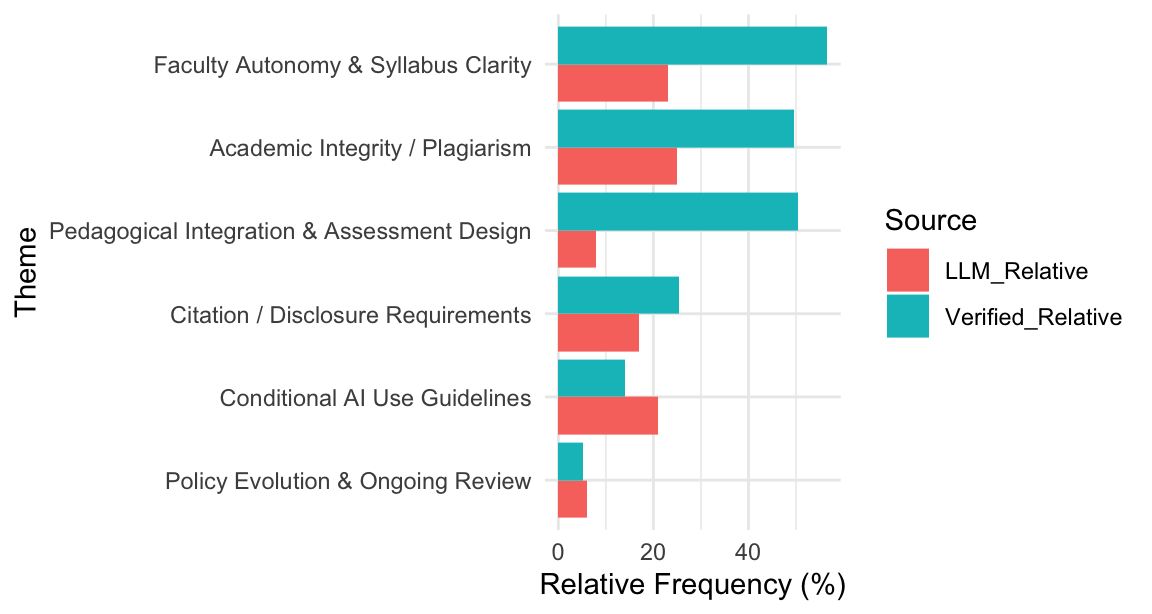
The red bars show LLM estimates; the blue bars represent keyword matches.
Similar bar heights do not establish agreement or validate the model’s interpretation; the denominators and counting rules differ.
Step 8: Statistical Consistency Check
We can describe the association across the six pairs of reported percentages with a Pearson correlation.
Finally, let us put a number on it:
cor(validation_compare$LLM_Relative,
    validation_compare$Verified_Relative,
    use = "complete.obs")
[1] 0.4053206# ≈ 0.7Across the six themes, the reported percentages have a Pearson correlation of r ≈ 0.4053. This is a descriptive association, not an accuracy score or evidence of agreement in document prevalence. The code comment # ≈ 0.7 is outdated; the displayed output is 0.4053206.
A correlation of r ≈ 0.4053 indicates a moderate positive relationship.
The two percentage series use different denominators and cannot establish the accuracy of either method.
Step 9: Interpretation and Reflection
The comparison illustrates two ways to organize information from the corpus:
| Approach | Focus | Strength | Limitation |
|---|---|---|---|
| Keyword-based Validation | Literal keyword matches | Explicit, inspectable rules | Can include unrelated uses or miss relevant wording |
| LLM Semantic Analysis | Model-generated themes | Context-based synthesis | Requires checking against source statements |
The LLM provides theme labels, descriptions, and examples for researchers to inspect.
Keyword matching records whether each statement contains at least one term from the specified list.
These outputs can help researchers identify passages and coding decisions that need review.
Agreement with human interpretation would need to be assessed using recorded judgments on the source statements.
So what did we learn?
| What the LLM Found | What Keywords Found | What This Tells Us |
|---|---|---|
| Theme shares normalized over reported counts | Shares of statements with keyword matches | Different denominators prevent direct comparison as document prevalence |
| Six reported theme percentages | Six keyword-match percentages | Their correlation describes association across themes, not coding accuracy |
| Complementary perspectives | Complementary perspectives | Different tools for different purposes |
As one co-author joked, “The LLM does not just read the policy—it understands the syllabus.”
Step 10: Refining the Keyword Definitions
Because keyword matching depends on how theme_keywords is defined, researchers should examine which relevant and irrelevant statements each rule captures.
Broad terms such as “learning” can match passages unrelated to the intended theme. Narrow terms can miss relevant passages that use different wording.
For example:
"Pedagogical Integration & Assessment Design" =
  c(
    "assignment design", "course design",
    "learning outcomes", "assessment method",
    "rubric", "instructional_strategy"
  )
Replacing single words (learning, assessment) with multi-word phrases changes which statements match.
Whether this improves precision or loses relevant statements must be checked against actual coding judgments; closer agreement with the LLM percentages is not enough.
Here is a quick guide:
| Goal | Keyword Strategy | Result |
|---|---|---|
| Be more precise | Use multi-word phrases (“academic integrity” instead of just “integrity”) | May exclude unrelated matches; check relevant statements that are lost |
| Be more thorough | Include synonyms and variants | May capture more relevant wording and additional false positives |
| Find the sweet spot | Mix specific and general terms | Evaluate precision and recall against recorded judgments |
Revise keyword lists to reflect the intended concepts, document the changes, and inspect the affected statements.
Interpreting the Cross-Method Validation Results
The comparison places two reported outputs from the same corpus side by side:
(1) the LM Studio semantic model output (LLM_Relative) and
(2) the keyword-match percentages (Verified_Relative) calculated from the AI policy statements. The LLM percentages divide by 52 reported theme counts; the keyword percentages divide by 99 statements. Table 9.5 retains those original values, so its columns should not be read as comparable document-prevalence estimates.
Summary of Observed Patterns
| Theme | LLM (%) | Keyword (%) |
|---|---|---|
| Academic Integrity / Plagiarism | 25.0 | 49.5 |
| Faculty Autonomy & Syllabus Clarity | 23.0 | 56.6 |
| Citation / Disclosure Requirements | 17.0 | 25.3 |
| Conditional AI Use Guidelines | 21.0 | 14.1 |
| Pedagogical Integration & Assessment Design | 8.0 | 50.5 |
| Policy Evolution & Ongoing Review | 6.0 | 5.1 |
Interpretation
The differences reflect both the counting rules and their denominators. The following table summarizes the two approaches:
| Approach | Focus | Strength | Limitation |
|---|---|---|---|
| Keyword-based Validation | Literal keyword matches | Explicit, inspectable rules | Can include unrelated uses or miss relevant wording |
| LLM Semantic Analysis | Model-generated themes | Context-based synthesis | Requires checking against source statements |
For example, a keyword rule can match “Pedagogical Integration” whenever the word assessment appears. To assess the model’s treatment of the same passages, researchers would need its statement-level assignments and independent coding judgments.
Quantitative Validation Conclusion
The comparison describes differences between the model’s reported theme shares and the keyword-match percentages. It does not establish greater semantic precision, agreement with human coding, or accuracy suitable for a particular research use. Those claims require a common unit of analysis and validation against the source statements.
The Role of Keyword Definitions in Validation Accuracy
The theme_keywords list defines the lexical rule for each theme. Its terms determine which statements count as matches. Choosing and revising these terms is a coding decision; the resulting counts do not themselves verify the LLM’s thematic interpretation.
The Sensitivity of Keyword Matching
For instance, consider the theme:
"Pedagogical Integration & Assessment Design" =
  c(
    "assignment", "assessment",
    "learning",
    "instruction", "pedagog"
  )
The broad terms in this list match about half of the 99 policy statements (≈ 50%). The LLM reports about 8% for the same theme, using the sum of 52 theme counts as its denominator. This gap cannot show whether the keywords overcounted the concept or the model missed relevant statements.
A narrower keyword set can change which statements match. To assess precision and recall, inspect the matched and unmatched statements against independent coding judgments.
Researchers can document each revision and inspect its effect on the corpus. A higher correlation with the LLM output is not sufficient evidence that a revised rule is more accurate.
"Pedagogical Integration & Assessment Design" =
  c(
    "assignment design", "course design",
    "learning outcomes", "assessment method",
    "rubric", "instructional strategy"
  )
Balancing Precision and Recall
| Objective | Keyword Strategy | Effect |
|---|---|---|
| Increase accuracy | Use multi-word expressions (e.g., “academic integrity,” “honor code”) rather than single words | May reduce false positives; check against coding judgments |
| Increase recall | Include common variants (e.g., “cite,” “citation,” “credit,” “acknowledge”) | May capture additional relevant statements |
| Balance both | Combine general terms with specific phrases | Requires evaluation of both missed and incorrect matches |
A broader keyword set can capture more wording but also unrelated uses. A narrower set can exclude relevant passages. Assess these trade-offs against recorded judgments instead of treating agreement with the model as the objective.
Interpretation
Keyword matching identifies statements that meet a lexical rule. LLM thematic extraction produces an interpretation of the text. Each output needs to be checked against the question being studied.
Refining theme_keywords may change the counts and their correlation with the LLM output. Any claimed improvement in accuracy requires evaluation against independently coded judgments. Report the revised rules and their effects rather than assuming that a higher correlation means better coding.
9.5.5.3 Case Study Discussion
The central research question guiding this case study was: Can a local LLM running through LM Studio accurately identify and summarize the key themes within university AI policy statements, while maintaining data privacy and interpretive reliability?
The case study shows that a local LLM can produce a thematic summary of these policy statements. The human-validation procedure is a method example, and the keyword comparison describes the reported outputs. Neither establishes the model’s accuracy or interpretive reliability.
Did the Workflow Perform as Expected?
Key findings are summarized below:
Key Findings
Theme Extraction:
The local LLM reported themes including academic integrity, faculty autonomy, and disclosure requirements.
The reported counts alone do not establish that its coding was more selective or more accurate than keyword matching.Interpretive Consistency:
The reported correlation (r ≈ 0.4053) describes a moderate positive association across six themes. It is not an estimate of coding accuracy or agreement in document prevalence.Human Validation Procedure:
The example shows how a researcher could record judgments about six LLM-generated themes.
Its six True entries and 100% calculation are illustrative; they do not demonstrate the model’s validity for research use.Efficiency and Ethics:
By running entirely offline, LM Studio ensured complete data sovereignty—no institutional text left the researcher’s machine.
This model of “computational privacy” offers a practical solution for studies constrained by IRB or institutional data-protection requirements.
Answer to the Research Question
The case study shows how a local model can generate a thematic summary for further qualitative work. Researchers still need to trace themes to source statements, record human judgments, and resolve disagreements before treating the output as validated evidence.
The model’s practical role here is to propose themes and summaries that researchers can examine and revise.
Limitations and Future Testing
The analysis also revealed several caveats that future researchers should note:
- The model’s token window constrains how much text can be processed at once. Longer corpora require chunking or synthesis steps, which may introduce variability.
- Keyword counts are sensitive to keyword definition. Accuracy must be assessed against recorded judgments, not inferred from the counts alone.
- Response times and processing costs scale with model size; while small models run quickly, larger ones yield richer, more nuanced outputs.
Further validation would require documented human judgments and a common basis for comparing theme frequencies.
This case study documents a local workflow for producing and inspecting a thematic summary of educational policy texts. The model output is available for review; its accuracy remains to be assessed independently.
9.5.6 Reflection
The case study shows how a local large language model (LLM), running within LM Studio, can produce thematic summaries as part of an educational research workflow.
From Tokens to Meaning
Traditional NLP methods, as explored in Section 2, rely heavily on token-level processing: word frequencies, co-occurrence patterns, and topic modeling through statistical clustering. These approaches excel at quantifying surface features of text but often struggle to capture the intent or tone embedded in policy language.
The local LLM produced theme labels, descriptions, and excerpts that connect concepts across policy statements. These are model-generated interpretations for researchers to check against the source texts.
The comparison in Sections 9.5.5–9.5.5.3 found a moderate positive association across six pairs of reported percentages (r ≈ 0.4053). This association does not establish accuracy, agreement in document prevalence, or greater semantic selectivity.
Complementarity, Not Replacement
Rather than viewing LLMs as replacements for traditional NLP, we should see them as complementary instruments in the researcher’s toolkit.
Conventional text mining offers transparency and replicability; LLMs contribute context, nuance, and synthesis. When combined, the two form a hybrid analytic ecology—where numbers inform narratives and narratives refine numbers.
In Chapter 4, we used token- and frequency-based approaches (including TF-IDF and topic modeling), which are strong baselines for corpus-level pattern detection.
Here, the local LLM supplied a thematic summary with descriptions and illustrative excerpts. That output provides material for qualitative review.
The human-validation example explains how to record review judgments. It does not supply empirical evidence that the model’s themes agree with independent human coding.
A hybrid strategy is often strongest: use conventional methods to identify broad patterns, then use LLM workflows to synthesize and interpret semantic structure.
Privacy and Practicality
Equally important is the ethical and logistical dimension. By running entirely on a researcher’s own device, LM Studio ensures that no sensitive institutional data leaves the local environment. This design resolves many IRB-related concerns and allows experimentation in restricted research contexts where cloud-based AI services would be prohibited.
The workflow does, however, require patience. Larger local models consume more time and computational resources than cloud endpoints. The tradeoff is greater data control and local reproducibility.
Yes, it requires a bit more patience (the model will not respond instantly), but the tradeoff is often worth it—especially for sensitive educational data.
Looking Ahead: From Analysis to Collaboration
The lessons from this section mark a transition from computational text analysis to intelligent collaboration with models. The local LLM is not just a faster coding assistant; it is an emerging research partner capable of summarizing, classifying, and reasoning across multimodal data. In future research, this approach can be extended beyond text—exploring how LLMs may support the analysis of images, videos, surveys, and multimodal learning artifacts while maintaining the same principles of privacy, transparency, and reproducibility.
What we have done here with text is just the beginning. In Chapter 10, we will explore how LLMs can analyze images—yes, photos!—opening up entirely new possibilities for educational research. Same privacy-focused approach, but now we are working with visual data.
In summary:
Section 2 taught us how to count words;
This chapter showed how local models can support meaning-focused analysis with stronger privacy control.
Together, they represent a powerful toolkit for computational research in education,
bridging the measurable and the meaningful, the statistical and the semantic, the algorithmic and the human.
9.6 Summary
This chapter demonstrated how a local large language model, running within LM Studio, can generate a thematic analysis of educational policy texts. The human-validation section illustrated a review procedure; its example judgments do not establish accuracy. The comparison with keyword counts used different percentage denominators and yielded a descriptive correlation of r ≈ 0.4053 across six themes. Researchers should check the model’s interpretations against the source texts before using them as findings. Local LLMs can support the frequency-based approaches introduced in Chapter 4, with human review guiding their use in qualitative interpretation.