# Install and load the igraph package
# install.packages("igraph")
library(igraph)

# Example: Load an edge list from CSV
edge_list <- read.csv("data/friendship_edges.csv")

# Create the graph object (directed network)
g <- graph_from_data_frame(edge_list, directed = TRUE)

# Plot the network
plot(g, main = "Friendship Network")Network Data
5.1 Overview
Social network analysis (SNA) is the process of investigating social structures through the use of networks and graph theory (Borgatti et al., 2013; Wasserman & Faust, 1994). It maps and measures relationships and flows between people, groups, organizations, computers, or other information/knowledge processing entities — capturing not just individual attributes but the connections between them. In educational research, SNA has been applied to understand collaboration structures, examine the spread of information and influence, and evaluate the effects of instructional interventions on learner interactions (Carolan, 2014).
These applications range from analyzing face-to-face classroom dynamics to large-scale online learning environments. For example, Kellogg & Edelmann (2015) examined discussion networks in a massively open online course, and Rosenberg & Staudt Willet (2021) explored how social influence models can be advanced within learning analytics contexts. Used this way, SNA can identify patterns and trends in how networks form and operate, predict future behavior, and inform the design of interventions that improve learning environments.
Portions of this chapter adapt instructional and research resources developed through the NSF-supported Learning Analytics in STEM Education Research (LASER) Institute. See the Preface for the full acknowledgment and disclaimer.
5.2 Accessing SNA Data
Social Network Analysis (SNA) relies on relational data—information about connections (edges) between entities (nodes) such as students, teachers, or organizations. Compared to traditional survey or tabular data, SNA requires pairwise relational information. In education, this could include “who collaborates with whom,” “who talks to whom,” or digital traces of discussion and collaboration in online platforms.
5.2.1 Types and Sources of SNA Data
There are several common sources and structures for SNA data in educational research contexts:
- Survey-based Network Data: Collected via roster or name generator questions, e.g., “List the classmates you discuss assignments with.”
- Behavioral/Observational Data: Derived from logs of actual interactions, e.g., forum replies, emails, classroom seating.
- Archival or Digital Trace Data: Extracted from digital platforms such as MOOCs, LMS discussion forums, Slack, Twitter, or Facebook.
- Administrative/Organizational Data: Information about formal structures such as team membership or co-authorship.
Data Structure: Most SNA data are formatted as: - Edge List (two columns: source and target) - Adjacency Matrix (rows and columns are actors; cell values indicate a tie) - Node Attributes (supplementary information about each node, e.g., gender, role)
5.2.2 Example 1: Creating a Simple Network from an Edge List
Below is an example of constructing a network from a simple CSV edge list. This mirrors typical classroom survey data (“who do you consider your friend in this class?”).
5.2.3 Example 2: Generating Network Data from Digital Traces
Many educational datasets now come from online discussion forums, MOOCs, or LMS systems. For example, the MOOC case study (Kellogg & Edelmann, 2015) uses reply relationships in online courses to construct discussion networks.
# Example data with from_user and to_user columns
mooc_edges <- read.csv("data/mooc_discussion_edges.csv")
g_mooc <- graph_from_data_frame(
  mooc_edges,
  directed = TRUE
)
plot(g_mooc, main = "MOOC Discussion Network")
5.2.4 Example 3: Collecting SNA Data via Surveys
If you want to collect your own network data:
Ask participants to name or select (from a roster) their friends, collaborators, or contacts.
Compile responses into an edge list.
Example survey prompt:
“Please list up to five classmates you seek help from most frequently.”
TipTip
Survey-based SNA is easier to manage with small to medium groups. For larger networks, digital trace or archival data may be more practical.
5.2.5 Node Attribute Data
You can also load additional data about each node (student, teacher, etc.) to enable richer analyses (e.g., centrality by gender or role).
node_attributes <- read.csv("data/friendship_nodes.csv")
# Add attributes to igraph object
V(g)$gender <- node_attributes$gender[
  match(V(g)$name, node_attributes$name)
]
5.2.6 Further Examples
- Public Datasets:
- Synthetic Data:
R’s
igraphpackage can also generate sample networks for practice:library(igraph) g_sample <- sample_gnp(n = 10, p = 0.3) plot(g_sample, main = "Random Sample Network")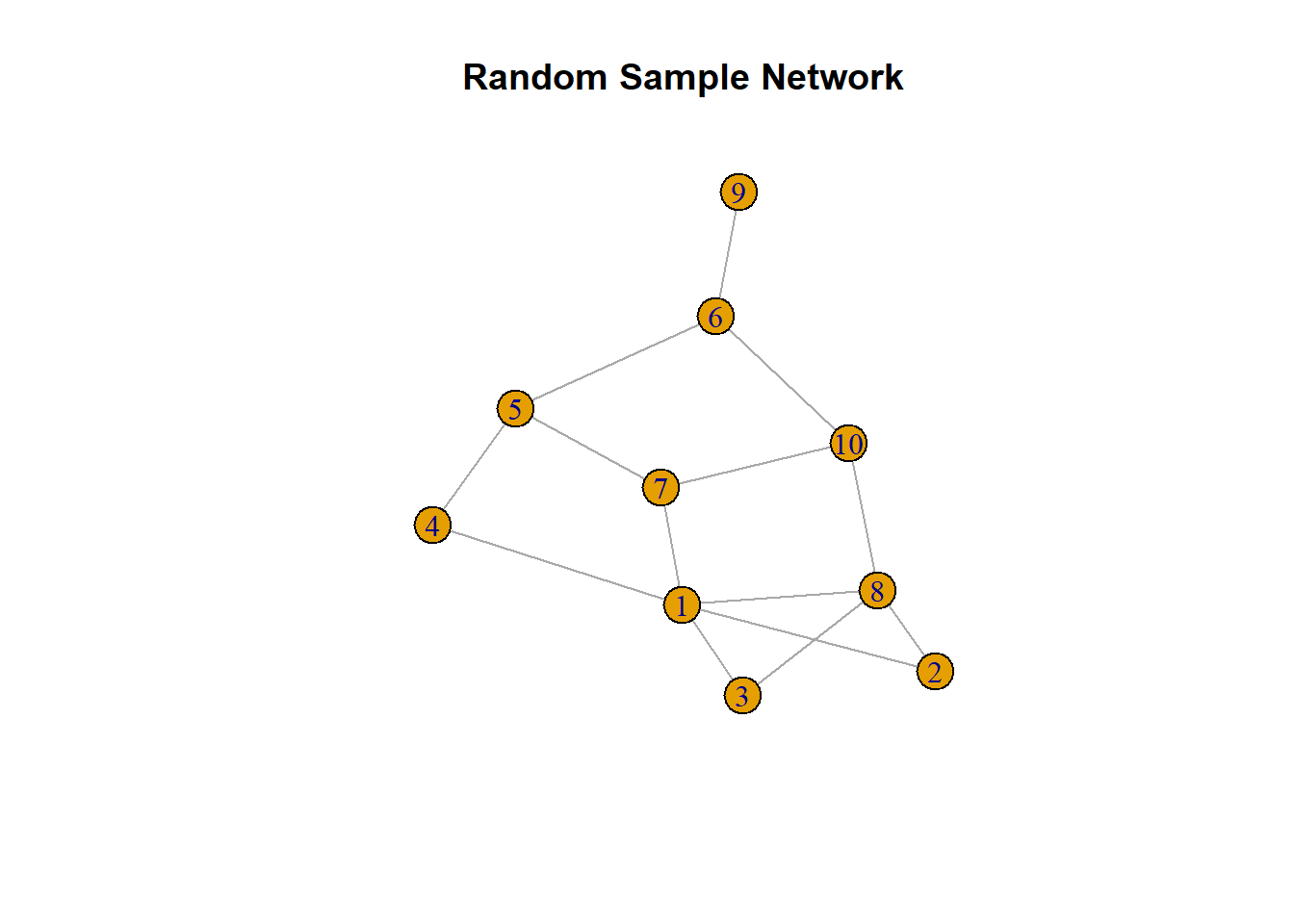
Figure 5.1. Randomly generated sample network
5.2.7 Best Practices and Tips
ImportantSNA Best Practices
- Ethics: Social network data can be sensitive. Protect anonymity and comply with IRB/data use guidelines.
- Format Consistency: Always clarify whether ties are directed/undirected, binary/weighted, and ensure consistent formatting.
- Missing Data: Especially in survey-based SNA, missing responses can impact network structure and interpretation.
5.2.8 Summary
Accessing SNA data involves both careful design (in the case of surveys/observations) and extraction/wrangling (in the case of digital traces or archival records). The choice of data source and structure will directly influence the kinds of questions you can answer with SNA.
NoteRecommended Reading
- Borgatti, S. P., Everett, M. G., & Johnson, J. C. (2018). Analyzing Social Networks (2nd ed). SAGE.
- Kellogg, S., & Edelmann, A. (2015). Massive open online course discussion forums as networks.
5.3 Network Management & Measurement in Social Network Analysis
5.3.1 Purpose and Case
Purpose: This section demonstrates how to manage, measure, and visualize large-scale discussion networks from online professional development settings. Through this real-world example, we guide readers in loading relational data, constructing a directed network, and conducting a suite of essential SNA measures. The focus is on classroom- and course-level online discussions, which are representative of many contemporary educational and research settings.
Case Study: The case data comes from two cohorts of an online professional development program (“DLT1” and “DLT2”). Each cohort’s discussion data includes (a) edge list data capturing who replied to whom, and (b) node/actor attributes describing roles (e.g., facilitator, expert). These data allow us to reconstruct and analyze the full structure of communication in two authentic online learning communities.
5.3.2 Sample Research Questions
- RQ1: What is the overall structure of interaction in each online discussion cohort? Are they densely connected, or fragmented?
- RQ2: Who are the most central or influential actors in the network? How do facilitators or experts compare with regular participants?
- RQ3: To what extent are ties reciprocated (mutual) and how cohesive are the networks?
- RQ4: How do the network properties (e.g., density, reciprocity, clustering) compare between cohorts?
5.3.3 Analysis
Step 1: Install and Load Required Packages
# Install and load necessary libraries
# install.packages(c(
#   "tidygraph", "ggraph", "readr", "janitor"
# ))
library(tidygraph)
library(ggraph)
library(readr)
library(janitor)
library(igraph)
library(dplyr)
Step 2: Import and Clean Data
Load Edges and Node Attributes for DLT1:
# Load edge list (who replied to whom)
dlt1_ties <- read_csv("data/dlt1-edges.csv",
  col_types = cols(Sender = col_character(),
                   Receiver = col_character(),
                   `Category Text` = col_skip(),
                   `Comment ID` = col_character(),
                   `Discussion ID` = col_character())) |>
  clean_names()

# Load node attributes (participant roles, etc.)
dlt1_actors <- read_csv("data/dlt1-nodes.csv",
  col_types = cols(UID = col_character(),
                   Facilitator = col_character(),
                   expert = col_character(),
                   connect = col_character())) |>
  clean_names()

dlt1_ties |>
  select(
    sender, receiver, timestamp,
    discussion_category, comment_id
  ) |>
  slice_head(n = 4)
# A tibble: 4 x 5
sender receiver timestamp discussion_category comment_id
<chr> <chr> <chr> <chr> <chr>
1 360 444 4/4/13 16:32 Group N 2
2 356 444 4/4/13 18:45 Group D-L 3
3 356 444 4/4/13 18:47 Group D-L 4
4 344 444 4/4/13 18:55 Group O-T 5 dlt1_actors |>
select(
uid, facilitator, role1,
gender, expert, connect
) |>
slice_head(n = 4)# A tibble: 4 x 6
uid facilitator role1 gender expert connect
<chr> <chr> <chr> <chr> <chr> <chr>
1 1 0 libmedia female 0 1
2 2 0 classteaching female 0 0
3 3 0 districtadmin female 0 1
4 4 0 classteaching female 0 0 Step 3: Construct and Explore the Network
# Build the directed network graph.
dlt1_network <- tbl_graph(
  edges = dlt1_ties,
  nodes = dlt1_actors,
  node_key = "uid",
  directed = TRUE
)

# Overview of the network
tibble::tibble(
  nodes = gorder(dlt1_network),
  edges = gsize(dlt1_network),
  components = igraph::components(
    as.igraph(dlt1_network)
  )$no
)
# A tibble: 1 x 3
nodes edges components
<dbl> <dbl> <dbl>
1 445 2529 4Step 4: Basic Visualization
# Quick overview plot (stress layout by default)
autograph(dlt1_network)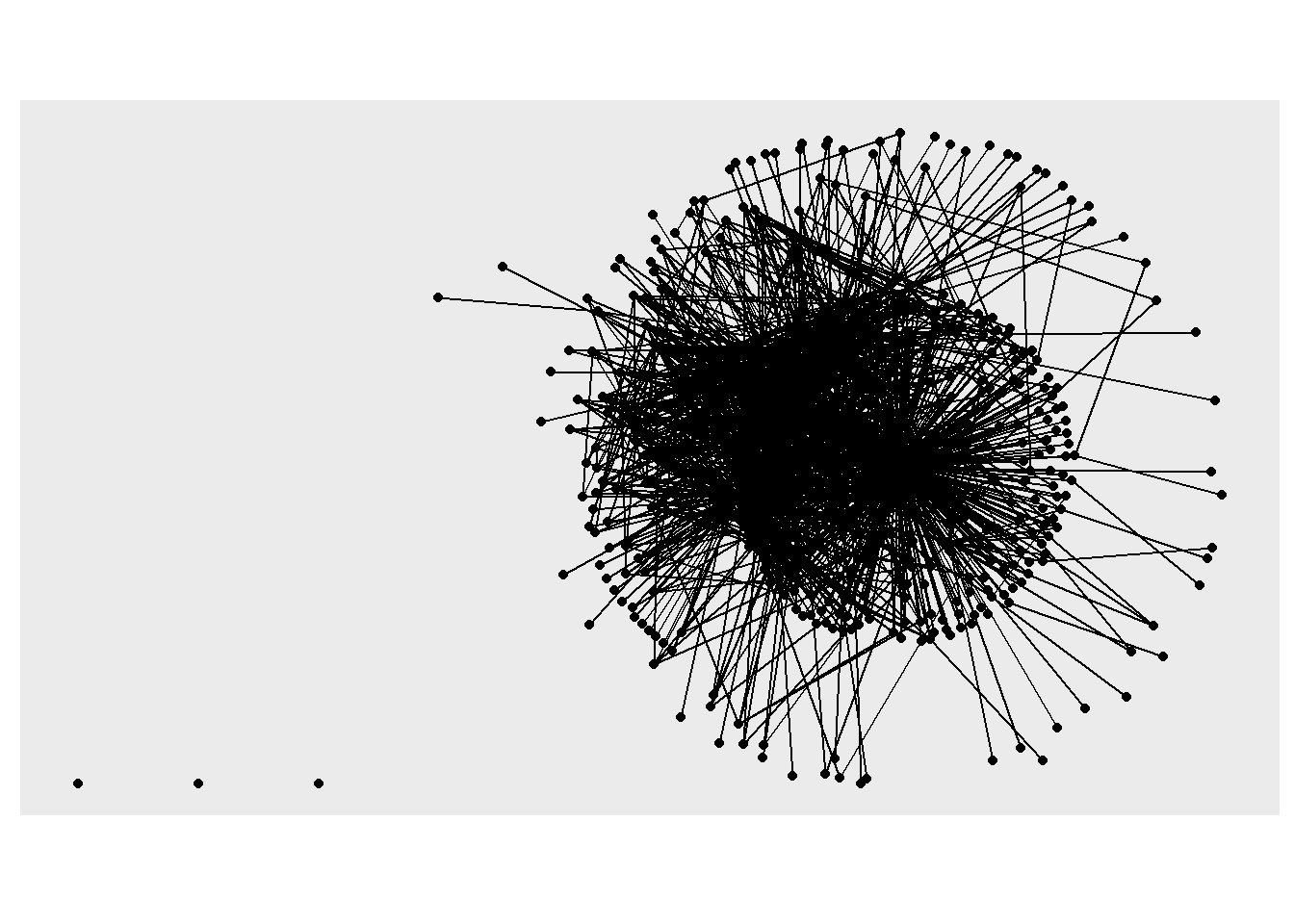
# Custom visualization with colors and centrality
ggraph(dlt1_network, layout = "fr") +
  geom_edge_link(alpha = .2) +
  geom_node_point(
    aes(color = role1, size = local_size())
  ) +
  theme_graph() +
  theme(text = element_text(family = "sans"))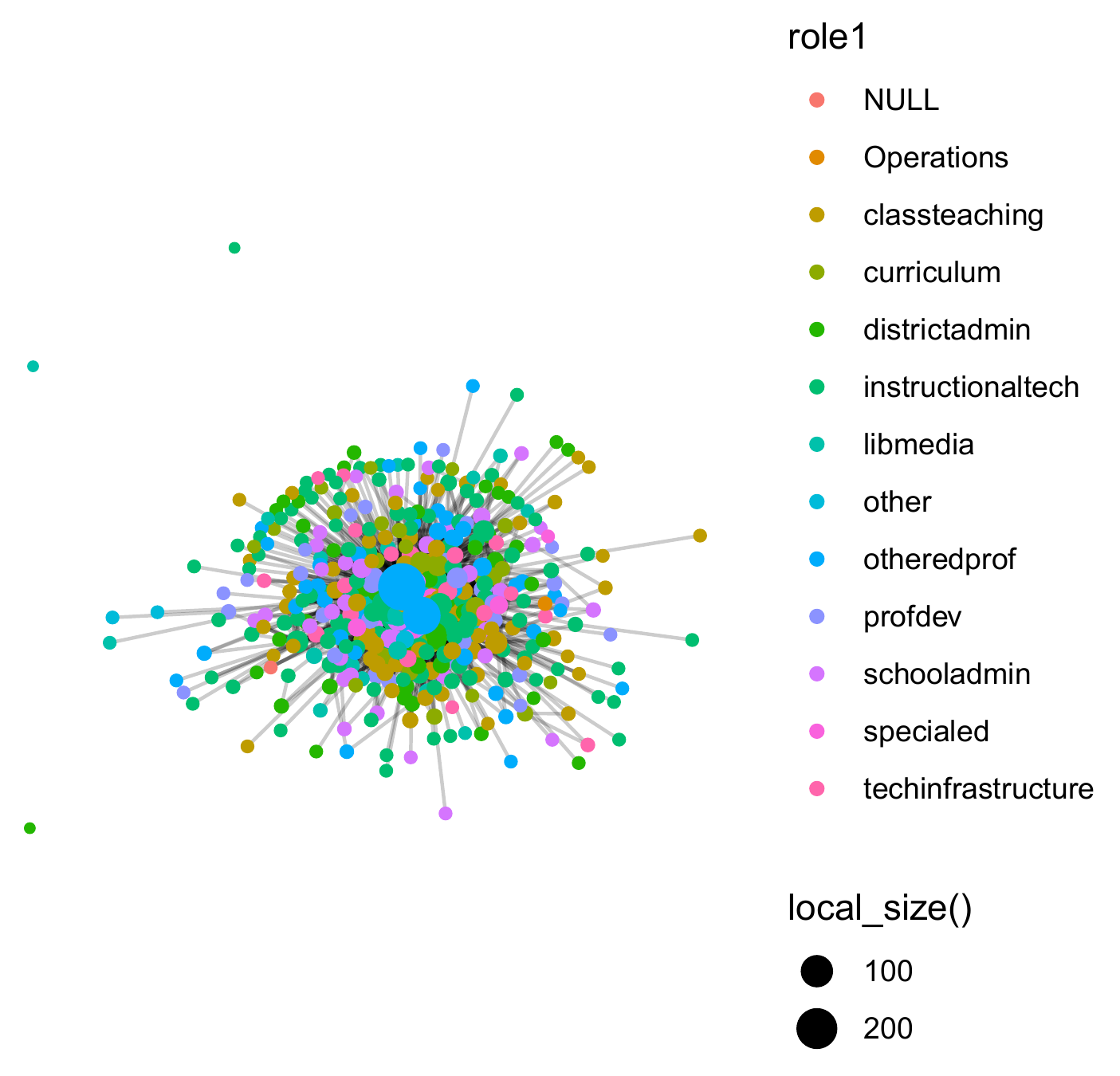
Step 5: Network Size and Centralization
# Number of nodes and edges
gorder(dlt1_network)
[1] 445gsize(dlt1_network) [1] 2529# Degree centrality (all, in, out)
deg_all <- centr_degree(dlt1_network, mode = "all")$res
deg_in <- centr_degree(dlt1_network, mode = "in")$res
deg_out <- centr_degree(dlt1_network, mode = "out")$res
# Centralization
centr_degree(dlt1_network, mode = "all")$centralization [1] 0.6429242centr_degree(dlt1_network, mode = "in")$centralization [1] 1.05702centr_degree(dlt1_network, mode = "out")$centralization [1] 0.2259389Step 6: Attach and Visualize Node Centrality
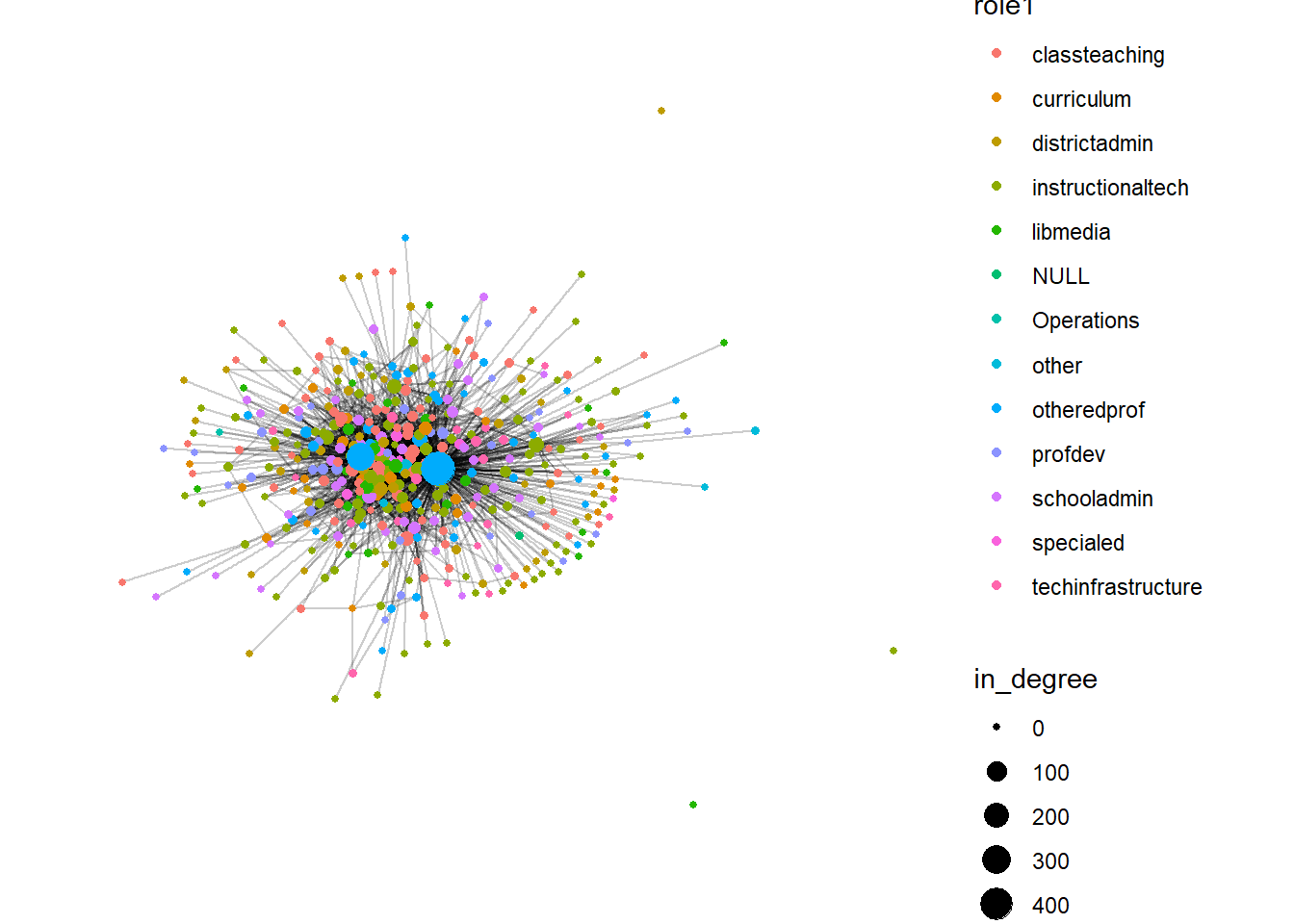
# Add in-degree centrality as node attribute
dlt1_network <- dlt1_network |>
  activate(nodes) |>
  mutate(in_degree = centrality_degree(mode = "in"))

# Plot, sizing nodes by in-degree
ggraph(dlt1_network, layout = "fr") +
  geom_edge_link(alpha = .2) +
  geom_node_point(aes(size = in_degree, color = role1)) +
  theme_graph() +
  theme(
    text = element_text(family = "sans"),
    legend.title = element_text(size = 8),
    legend.text = element_text(size = 7)
  )
Step 7: Network Density, Reciprocity, Clustering, Distance
# Density
edge_density(dlt1_network)
[1] 0.01279988# Reciprocity
reciprocity(dlt1_network) [1] 0.1997544# Add reciprocated edge attribute and plot
dlt1_network <- dlt1_network |>
activate(edges) |>
mutate(reciprocated = edge_is_mutual())
ggraph(dlt1_network, layout = "fr") +
geom_node_point(aes(size = in_degree)) +
geom_edge_link(aes(color = reciprocated), alpha = .2) +
theme_graph() +
theme(text = element_text(family = "sans"))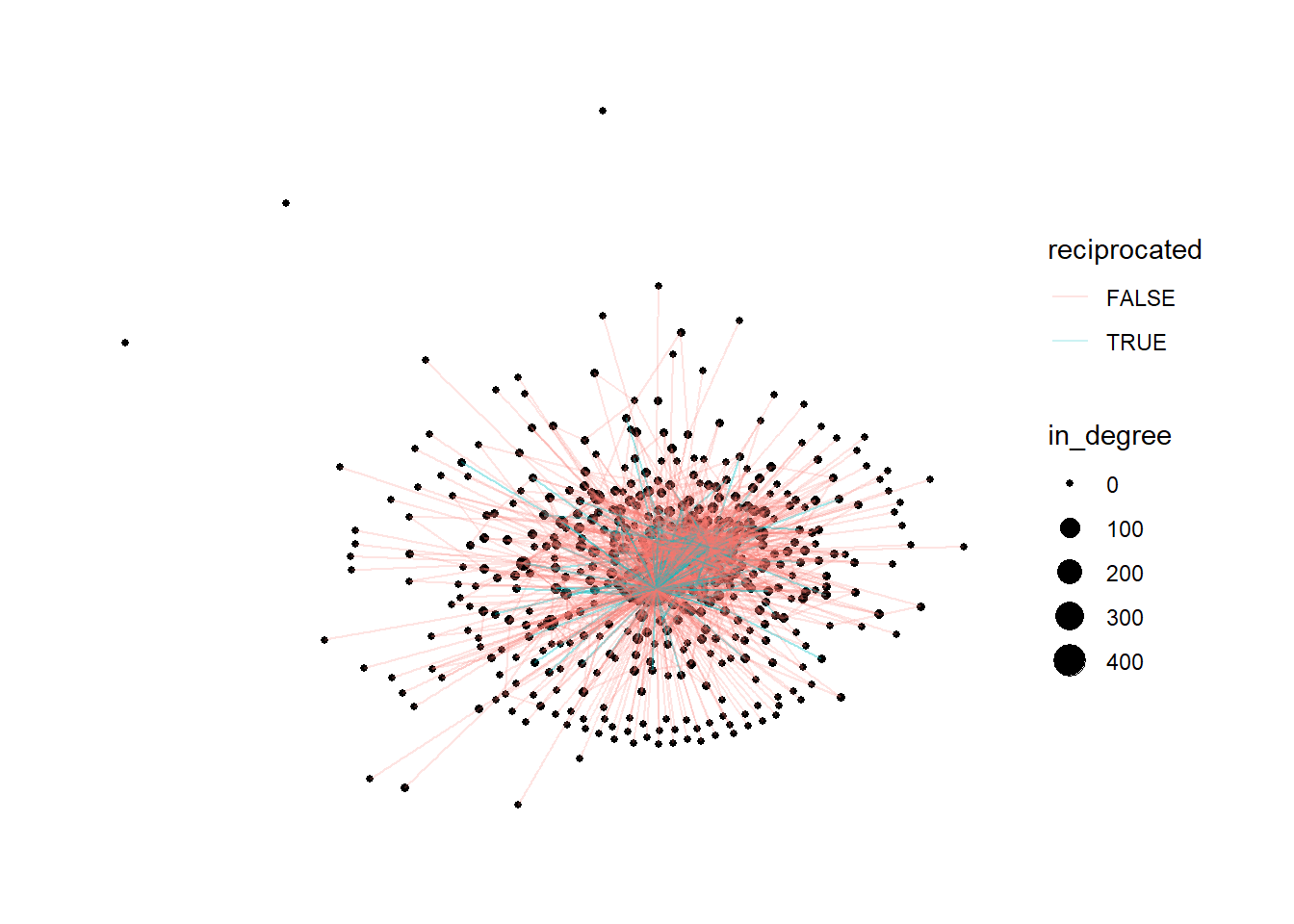
# Clustering (transitivity/global)
transitivity(dlt1_network)
[1] 0.08880774# Network diameter and average distance
diameter(dlt1_network) [1] 8mean_distance(dlt1_network) [1] 3.030694Step 8: Repeat for DLT2
# 1. Load the DLT2 edge and node data
dlt2_ties <- read_csv("data/dlt2-edges.csv",
  col_types = cols(Sender = col_character(),
                   Receiver = col_character(),
                   `Category Text` = col_skip(),
                   `Comment ID` = col_character(),
                   `Discussion ID` = col_character())) |>
  clean_names()

dlt2_actors <- read_csv("data/dlt2-nodes.csv",
  col_types = cols(UID = col_character(),
                   Facilitator = col_character(),
                   expert = col_character(),
                   connect = col_character())) |>
  clean_names()
# 2. Construct the directed network
dlt2_network <- tbl_graph(
edges = dlt2_ties,
nodes = dlt2_actors,
node_key = "uid",
directed = TRUE
)
# 3. Basic network properties
num_nodes <- gorder(dlt2_network)
num_edges <- gsize(dlt2_network)
# 4. Degree centrality (overall, in, out)
deg_all <- centr_degree(dlt2_network, mode = "all")$res
deg_in <- centr_degree(dlt2_network, mode = "in")$res
deg_out <- centr_degree(dlt2_network, mode = "out")$res# Centralization values
get_centralization <- function(mode) {
centr_degree(
dlt2_network,
mode = mode
)$centralization
}
centr_all <- get_centralization("all")
centr_in <- get_centralization("in")
centr_out <- get_centralization("out")
# 5. Attach centrality as a node attribute
dlt2_network <- dlt2_network |>
activate(nodes) |>
mutate(in_degree = centrality_degree(mode = "in"))# 6. Visualize the network
ggraph(dlt2_network, layout = "fr") +
geom_edge_link(alpha = .2) +
geom_node_point(
aes(color = role, size = local_size())
) +
theme_graph() +
theme(text = element_text(family = "sans"))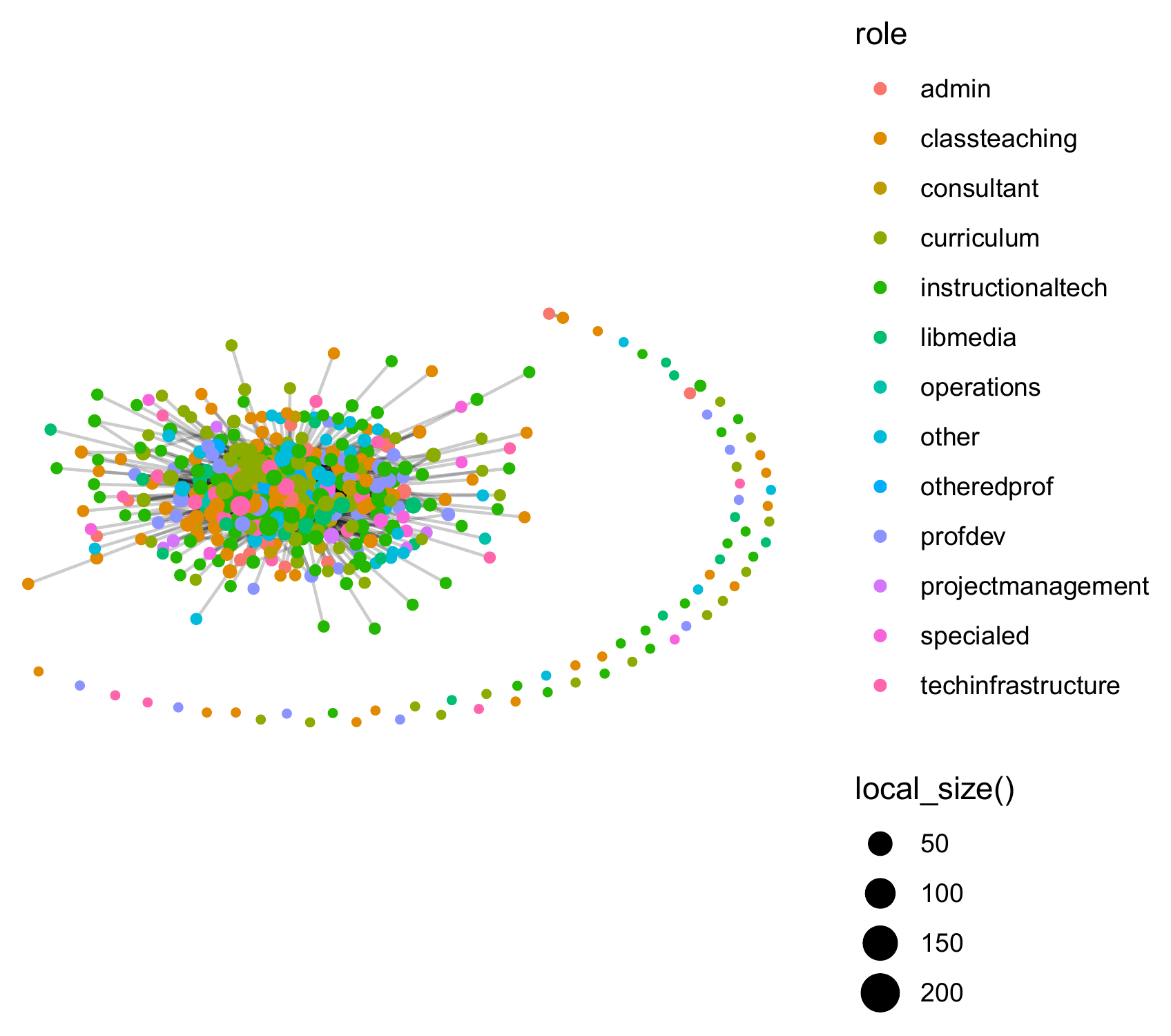
# 7. Density, reciprocity, clustering, distances
density <- edge_density(dlt2_network)
recip   <- reciprocity(dlt2_network)

dlt2_network <- dlt2_network |>
  activate(edges) |>
  mutate(reciprocated = edge_is_mutual())

ggraph(dlt2_network, layout = "fr") +
  geom_node_point(aes(size = in_degree)) +
  geom_edge_link(
    aes(color = reciprocated),
    alpha = .2
  ) +
  theme_graph() +
  theme(text = element_text(family = "sans"))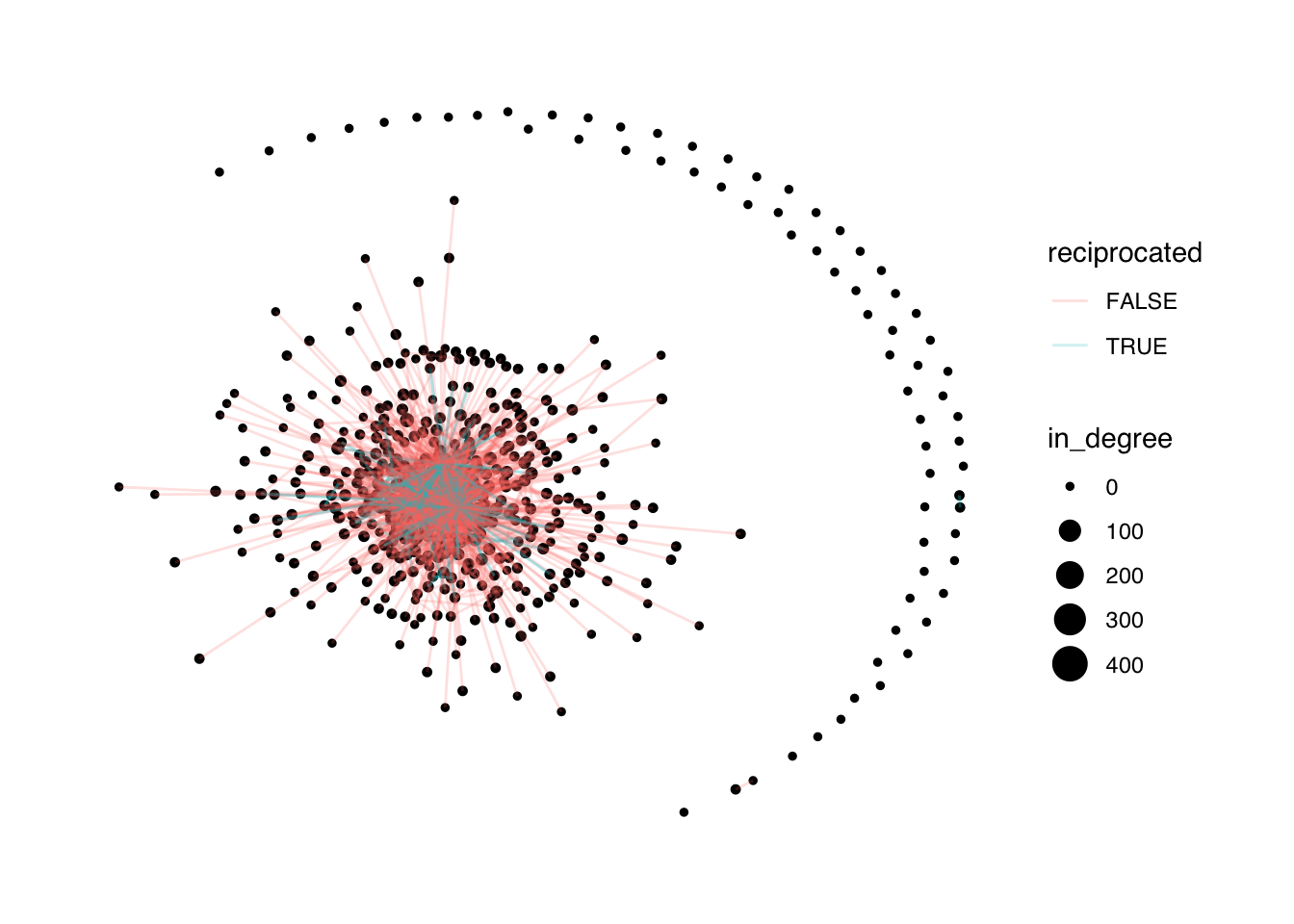
trans   <- transitivity(dlt2_network)
diam    <- diameter(dlt2_network)
mean_d  <- mean_distance(dlt2_network)
# 8. Print summary statistics (structured output)
dlt2_stats <- data.frame(
metric = c(
"Nodes", "Edges",
"Degree Centralization (all)",
"Degree Centralization (in)",
"Degree Centralization (out)",
"Density", "Reciprocity",
"Transitivity", "Diameter", "Mean Distance"
),
value = c(
num_nodes, num_edges,
centr_all, centr_in, centr_out,
density, recip,
trans, diam, mean_d
)
)print(dlt2_stats, row.names = FALSE, digits = 3) metric value
Nodes 4.92e+02
Edges 2.58e+03
Degree Centralization (all) 5.31e-01
Degree Centralization (in) 8.65e-01
Degree Centralization (out) 3.27e-01
Density 1.07e-02
Reciprocity 2.50e-01
Transitivity 1.25e-01
Diameter 8.00e+00
Mean Distance 3.04e+00A sample methods section of these analytical steps can be written as follows:
To examine interaction patterns in the DLT discussions, directed social networks were constructed from edge-list data representing reply ties between participants and node-level attribute data containing participant identifiers and role information. The data were imported from separate edge and node files, cleaned with
janitor::clean_names(), and merged into atbl_graphobject usingtidygraph, with sender-to-receiver ties treated as directed relationships. This structure is appropriate for modeling conversational exchanges in which the direction of a reply indicates the flow of communication.Network structure was first explored through basic graph visualization and descriptive network properties. Layout-based plots were generated with
ggraph, which is designed to visualize tidy network objects and supports node-level aesthetics such as role and degree-based size scaling. Overall network size was summarized using the number of nodes and edges, and degree centrality was calculated for all ties, in-ties, and out-ties to assess participant connectedness and directional prominence. Degree centralization was also computed to evaluate the extent to which the network was organized around highly connected actors.Additional structural measures were then calculated to characterize cohesion and reciprocity in the discussion networks. Node-level in-degree centrality was attached as a network attribute and visualized to highlight the most frequently addressed participants. Network density, reciprocity, transitivity, diameter, and mean geodesic distance were computed using standard graph-theoretic measures implemented in
igraph. Density captured overall tie concentration, reciprocity indicated the extent to which ties were mutual, and transitivity reflected clustering among connected actors. Diameter and mean distance summarized directed shortest paths among reachable ordered pairs of nodes, excluding unreachable pairs. The same procedures were repeated separately for DLT1 and DLT2 to support comparison across the two discussion networks.
5.3.4 Results and Discussion
RQ1: What is the overall structure of interaction in each cohort?
The interaction networks in both cohorts were large but sparse, indicating that participation was widespread without being uniformly connected. DLT1 included 445 nodes and 2529 directed edges, while DLT2 included 492 nodes and 2584 directed edges. Network density was low in both cases, with DLT1 at 0.013 and DLT2 at 0.011, meaning that only about 1% to 1.3% of all possible ties were present.
Both networks were multi-component, with several disconnected groups, although most participants were contained in the largest giant component. This pattern is typical of online discussion networks, where interaction tends to cluster within subgroups rather than extend evenly across all participants. Among reachable ordered pairs of nodes, both cohorts had a maximum shortest path length of 8 and an average of about 3.03 for DLT1 and 3.04 for DLT2. These calculations follow edge direction and exclude unreachable pairs; they are not restricted to the largest component.
These results describe short paths between reachable participants, alongside disconnected groups. Path length measures steps through the network, not the time information takes to travel.
RQ2: Who are the most central or influential actors?
The centrality results show a strongly right-skewed pattern in both cohorts: most participants have low degree centrality, while a small number of actors are highly connected and occupy more influential positions in the discussion network. In directed networks, in-degree reflects how often others direct ties toward an actor, while out-degree reflects how actively that actor initiates ties; together, these measures help distinguish between actors who are sought out and those who are highly active in reaching others.
In both DLT1 and DLT2, facilitators and a small set of especially active participants function as network hubs, receiving and/or initiating a disproportionate share of interactions. This pattern is consistent with the interpretation of high degree centrality as a sign of prominence, influence, or conversational activity in social networks. Degree centralization values further show that DLT1 is more centralized than DLT2, with all-ties centralization of 0.64 in DLT1 versus 0.53 in DLT2; in-degree centralization is also higher in DLT1 (1.06) than in DLT2 (0.87), while out-degree centralization is 0.23 in DLT1 and 0.33 in DLT2.
Network visualizations that size nodes by in-degree make these central actors immediately visible, highlighting the limited number of participants who anchor communication in each cohort. Substantively, these individuals—often facilitators—likely played important roles in guiding discussion, responding to contributions, and sustaining engagement among less active members.
RQ3: Are ties reciprocated?
Reciprocity was moderate in both cohorts, indicating that some interactions were mutual but most were one-way. DLT1 had a reciprocity rate of 0.20, meaning 20% of ties were reciprocated, while DLT2 had a slightly higher rate of 0.25.
This pattern suggests that the discussion networks combined broadcasting with dialogue. In other words, many replies or messages did not receive an immediate return tie, but a meaningful minority of relationships showed mutual exchange, which is consistent with a mix of one-to-many communication and peer-to-peer interaction in online learning settings. A reciprocity level in this range is often interpreted as evidence of selective engagement rather than fully symmetric conversation across the entire network.
RQ4: How cohesive are the networks?
The networks showed low transitivity, indicating limited triadic closure and relatively few closed triangles. DLT1 had a clustering coefficient of 0.089, and DLT2 had a slightly higher value of 0.125, suggesting that connected participants were only occasionally embedded in tightly knit local groups.
Substantively, this means the networks were more hub-and-spoke than cliquish: participants were often linked through central actors rather than through dense clusters of mutually connected peers. This pattern is consistent with discussion spaces in which a few highly connected individuals connect otherwise separate participants, but close-knit subgroups remain limited.
Despite the low clustering, the longest finite directed shortest path in each network was 8 steps, and the mean was about 3.0. These values describe reachable ordered pairs of nodes. They do not mean that every participant can reach every other participant, since unreachable pairs are excluded.
Comparison Across Cohorts
Overall, the two cohorts exhibited very similar interaction structures. DLT2 was slightly larger, with more participants and more interactions than DLT1, but the core network properties were largely comparable across the two groups. Both networks were sparse, centrally organized, and only moderately reciprocal, which is a common pattern in large online discussion networks where a small number of actors account for much of the activity.
Minor differences suggest modest variation in how the discussions unfolded. DLT2 showed slightly higher reciprocity and clustering, which may reflect differences in facilitation style, participant composition, or the degree of peer-to-peer engagement in that cohort. Even so, both networks followed the same broad pattern: a handful of central actors drove most interactions, ties were efficient but not dense, and genuine dialogue occurred but was not universal
Educational Implications
These findings suggest that a small number of highly active facilitators or students play an outsized role in sustaining interaction within online discussion networks. For educators and instructional designers, this means that strategies such as required peer response, rotating discussion leadership, and structured prompts for back-and-forth exchange may help distribute participation more evenly and strengthen network cohesion.
For researchers, the results show the value of examining centrality, reciprocity, and cohesion together when studying online learning communities. Identifying who occupies central positions can help reveal which participants may be supporting dialogue, which may be isolated, and where targeted interventions could improve inclusion and engagement.
Summary:
Through these SNA measures, we have shown how to reconstruct, visualize, and interpret the structure of large-scale online discussion networks. The approach enables identification of core communicators, understanding of participation patterns, and empirical comparison across cohorts or interventions. This “cookbook” can be adapted to other online learning or collaborative contexts.
NoteNote
This analysis is based on real-world data from online professional development courses. The methods and findings can be generalized to other educational settings where social networks play a role in learning and collaboration.
5.4 Case Study: Hashtag Common Core
5.4.1 Purpose and Case
The purpose of this case study is to demonstrate the application of social network analysis (SNA) in a real-world policy context: the heated national debate over the Common Core State Standards (CCSS) as it played out on Twitter. Drawing on the work of Supovitz, Daly, del Fresno, and Kolouch, the #COMMONCORE Project provides a vivid example of how social media-enabled networks shape educational discourse and policy.
This case focuses on: - Identifying key actors (“transmitters,” “transceivers,” and “transcenders”) and measuring their influence. - Detecting subgroups/factions within the conversation. - Exploring how sentiment about the Common Core varies across network positions. - Demonstrating network wrangling, visualization, and analysis using real tweet data.
Data Source
Data was collected from Twitter’s public API using keywords/hashtags related to the Common Core (e.g., #commoncore, ccss, stopcommoncore). The dataset includes user names, tweets, mentions, retweets, and relevant timestamps from a sample week. Only public tweets are included, and user privacy is respected.
5.4.2 Sample Research Questions
- RQ1: Who are the “transmitters,” “transceivers,” and “transcenders” in the Common Core Twitter network?
- RQ2: What subgroups or factions exist within the network, and how are they structured?
- RQ3: How does sentiment about the Common Core vary across actors and subgroups?
- RQ4: What other patterns of communication (e.g., centrality, clique formation, isolates) characterize this network?
5.4.3 Analysis
Step 1: Load Required Packages
library(tidyverse)
library(tidygraph)
library(ggraph)
library(skimr)
library(igraph)
library(tidytext)
Step 2: Data Import and Wrangling
# Import tweet data in edgelist format.
ccss_path <- "data/ccss-tweets.csv"
ccss_tweets <- read_csv(ccss_path)

# Keep sender, mentioned users, timestamp, and text.
ties_1 <- ccss_tweets |>
  relocate(
    sender = screen_name,
    target = mentions_screen_name
  ) |>
  select(sender, target, created_at, text)

# Unnest receiver to handle multiple mentions per tweet
ties_2 <- ties_1 |>
  unnest_tokens(
    input = target,
    output = receiver,
    to_lower = FALSE
  ) |>
  relocate(sender, receiver)

# Drop tweets without mentions.
ties <- ties_2 |>
  drop_na(receiver)
# Build nodelist
actors <- ties |>
select(sender, receiver) |>
pivot_longer(
cols = c(sender, receiver),
names_to = "role",
values_to = "actors"
) |>
select(actors) |>
distinct()
# Create Network Object
ccss_network <- tbl_graph(
edges = ties,
nodes = actors,
directed = TRUE
)
tibble::tibble(
nodes = gorder(ccss_network),
edges = gsize(ccss_network),
components = igraph::components(
as.igraph(ccss_network)
)$no
)# A tibble: 1 x 3
nodes edges components
<dbl> <dbl> <dbl>
1 46 42 14Step 4: Network Structure – Components, Cliques, and Communities
- Components Identify weak and strong components (connected subgroups):
ccss_network <- ccss_network |>
  activate(nodes) |>
  mutate(
    weak_component = group_components(type = "weak"),
    strong_component = group_components(type = "strong")
  )

# View component sizes
ccss_network |>
  as_tibble() |>
  group_by(weak_component) |>
  summarise(size = n()) |>
  arrange(desc(size)) |>
  slice_head(n = 6)
# A tibble: 6 x 2
weak_component size
<int> <int>
1 1 14
2 2 6
3 3 4
4 4 3
5 5 3
6 6 2- Cliques Identify fully connected subgroups (if any):
ccss_cliques <- cliques(ccss_network, min = 3)
length(ccss_cliques)
[1] 6head(ccss_cliques, n = 3)[[1]]
+ 3/46 vertices, from c9b6208:
[1] 4 5 6
[[2]]
+ 3/46 vertices, from c9b6208:
[1] 39 40 41
[[3]]
+ 3/46 vertices, from c9b6208:
[1] 3 4 6- Communities Detect densely connected communities using edge betweenness:
ccss_network <- ccss_network |>
  morph(to_undirected) |>
  activate(nodes) |>
  mutate(sub_group = group_edge_betweenness()) |>
  unmorph()

ccss_network |>
  as_tibble() |>
  group_by(sub_group) |>
  summarise(size = n()) |>
  arrange(desc(size)) |>
  slice_head(n = 6)
# A tibble: 6 x 2
sub_group size
<int> <int>
1 1 10
2 2 6
3 3 4
4 4 3
5 5 3
6 6 2Step 5: Egocentric Analysis – Centrality & Key Actors
ccss_network <- ccss_network |>
  activate(nodes) |>
  mutate(
    size = local_size(),
    in_degree = centrality_degree(mode = "in"),
    out_degree = centrality_degree(mode = "out"),
    closeness = centrality_closeness(),
    betweenness = centrality_betweenness()
  )
# Identify top actors by out_degree (transmitters),
# in_degree (transceivers), and both (transcenders)
top_transmitters <- ccss_network |>
as_tibble() |>
arrange(desc(out_degree)) |>
slice_head(n = 5)
top_transceivers <- ccss_network |>
as_tibble() |>
arrange(desc(in_degree)) |>
slice_head(n = 5)# Transcenders: high in-degree and out-degree,
# using the top 10% threshold for each metric.
top_transcenders <- ccss_network |>
as_tibble() |>
filter(
out_degree > quantile(out_degree, 0.9),
in_degree > quantile(in_degree, 0.9)
)Step 6: Visualize the Network
ggraph(ccss_network, layout = "fr") +
  geom_node_point(
    aes(size = out_degree, color = out_degree)
  ) +
  geom_edge_link(alpha = .2) +
  theme_graph() +
  theme(text = element_text(family = "sans"))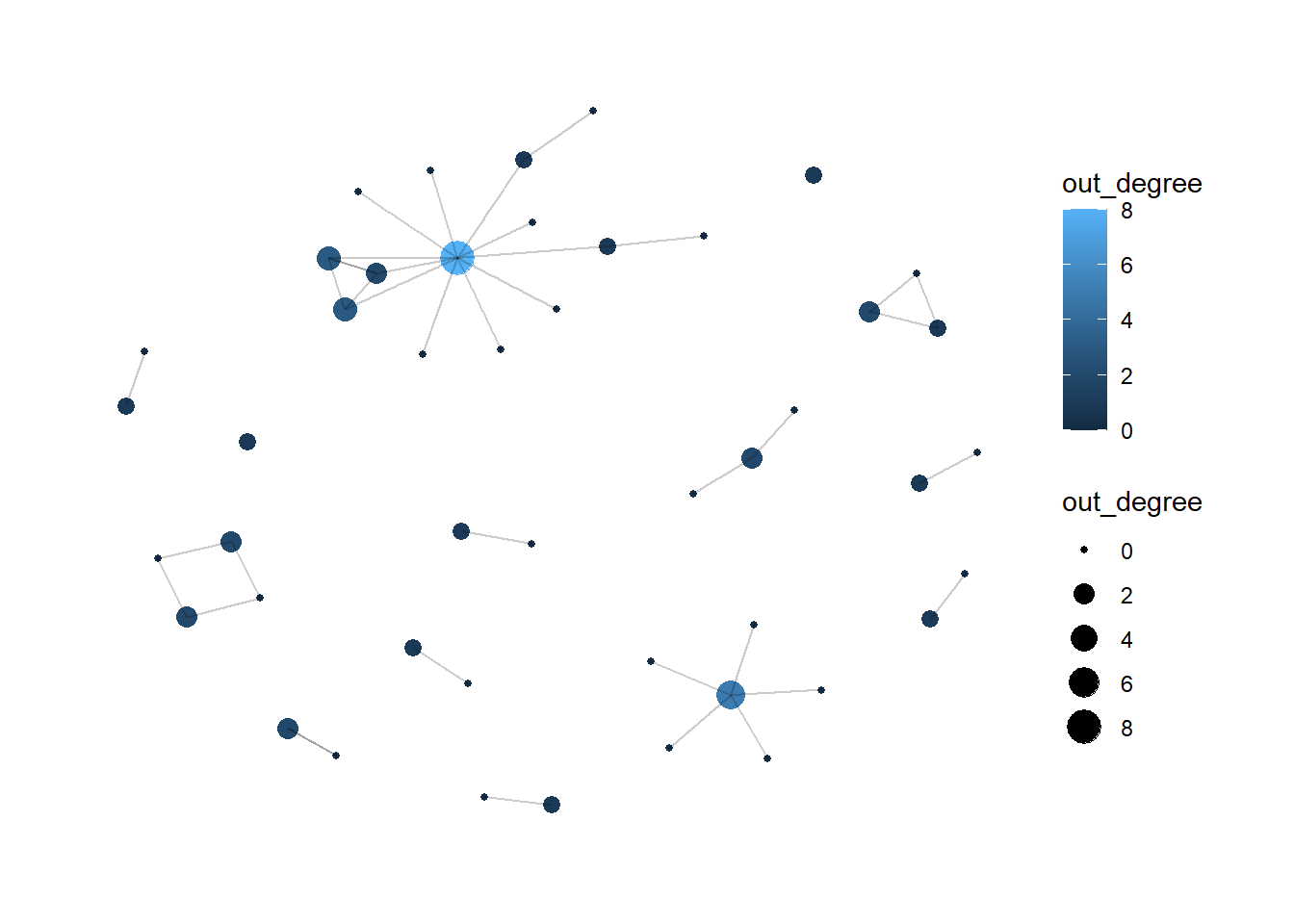
Step 7: Sentiment Analysis (Optional)
library(vader)
vader_ccss <- vader_df(ccss_tweets$text)
mean(vader_ccss$compound)

vader_ccss_summary <- vader_ccss |>
  mutate(sentiment = case_when(
    compound >= 0.05 ~ "positive",
    compound <= -0.05 ~ "negative",
    TRUE ~ "neutral"
  )) |>
  count(sentiment)
A sample methods section can be written for the steps above as follows:
Methods
Twitter data related to CCSS were imported from a CSV file containing sender, mentioned user(s), timestamp, and tweet text. The data were reshaped into a directed edge list, with the tweeting account treated as the sender and mentioned accounts treated as receivers. Tweets containing multiple mentions were separated so that each mention represented an individual directed tie, and tweets without mentions were excluded. A node list of unique actors was then constructed, and the resulting sender–receiver data were used to build a directed network.
Network structure was examined by identifying weak and strong components, cliques of three or more actors, and communities using edge-betweenness clustering on an undirected version of the network. To assess actor prominence, in-degree, out-degree, closeness, and betweenness centrality were calculated at the node level. Actors with the highest out-degree were treated as key transmitters, those with the highest in-degree as key receivers, and actors high on both measures as highly central participants. The network was visualized using a force-directed layout, with node size mapped to out-degree.
An optional sentiment analysis was conducted using VADER to summarize the emotional tone of tweet text. Compound sentiment scores were computed for each tweet and classified as positive, negative, or neutral using standard thresholds.
5.4.4 Results and Discussion
RQ1: Who are the “transmitters,” “transceivers,” and “transcenders” in the Common Core Twitter network?
In the Common Core Twitter network, a small number of actors dominated communication. Transmitters were led by SumayLu, who initiated eight outgoing ties, followed by DouglasHolt with five, WEquilSchool with three, fluttbot with three, and JoeWEquil with two. These accounts were the most active in broadcasting, mentioning, or retweeting others within the network.
The most prominent transceivers were WEquilSchool and SumayLu, each with an in-degree of three, followed by JoeWEquil, Tech4Learni…, and LASER_Insti…, each with an in-degree of two. These actors received the most attention from others and likely served as focal points in the conversation.
Only two users qualified as transcenders, meaning they were both highly active senders and frequent recipients of ties. WEquilSchool had an in-degree of three and an out-degree of three, while SumayLu had an in-degree of three and an out-degree of eight. These bridging actors appear to have played especially important roles in connecting and sustaining the discourse.
RQ2: What subgroups or factions exist in the network?
Component analysis indicates that the Common Core Twitter network was highly fragmented. There were 14 weakly connected components, with the largest containing 14 users, and many additional components consisting of only two or three members. This pattern suggests limited overall cohesion and multiple parallel or isolated conversations rather than one fully integrated discussion space.
Clique analysis identified six fully connected subgroups: five three-person cliques and one four-person clique. The four-person clique involved nodes 3, 4, 5, and 6 and contained four of the three-person cliques, which are counted separately. Such structures point to small pockets of tightly knit interaction, although they were rare relative to the overall size of the network.
Community detection using edge betweenness identified 16 subgroups, broadly consistent with the component structure. The largest subgroup contained 10 members, while most of the remaining communities were much smaller. Taken together, these results suggest a network organized around several small, partially isolated clusters rather than a single cohesive conversation.
RQ3: What is the overall sentiment in the network?
VADER sentiment analysis of the tweet content produced an average compound score of 0.09, indicating a slightly positive overall sentiment. Although the broader policy context surrounding the Common Core is often contentious, the sampled tweets were, on balance, more positive than negative.
When classifying individual tweets as positive, neutral, or negative, the distribution showed a mix of all three categories, with positive tweets slightly outnumbering negative ones. This pattern suggests that, at least during this period, the Twitter conversation included advocacy, supportive comments, and constructive dialogue, rather than being dominated by criticism or negativity.
RQ4: What other patterns of communication (e.g., centrality, clique formation, isolates) characterize this network?
The network exhibits a strongly centralized “star-like” structure within its largest component. Two users, SumayLu and WEquilSchool, emerge as central hubs, with high out-degree and in-degree centrality, respectively. The majority of other users have very low degree values, often 0 or 1, indicating that they are peripheral and engaged in few interactions.
Clique analysis identified six fully connected subgroups of three or more users: one 4-person clique and five 3-person cliques, some of which overlap. However, such tightly knit groups are relatively rare; most communication occurs outside of dense subgroups. The network contains 14 weak components, many of them very small, with several users appearing as isolates or embedded in isolated dyads and triads. These actors are disconnected from the main conversation or only weakly integrated.
Overall, communication in this network is characterized by a small set of highly central users, sparse and fragmented connectivity, and a substantial number of isolates, which together suggest limited network-wide cohesion and a concentration of interaction around a few key accounts.
Discussion
This analysis of the Common Core Twitter conversation reveals a sparse and fragmented network, with debate distributed across many small subgroups and only one moderately sized connected component. Communication is anchored by a small number of key actors who act as broadcasters and focal points, while the majority of users occupy peripheral positions with minimal interaction.
Tightly connected cliques and communities are few and small, reinforcing the absence of broad network-wide cohesion. At the same time, VADER sentiment scores indicate a slightly positive overall tone, suggesting that the sampled conversation includes advocacy, promotional messaging, and constructive dialogue more than unrelenting criticism.
For researchers and practitioners, this pattern highlights the importance of intentionally engaging transcendent actors—those who both send and receive many ties—as potential bridges across subgroups. The network’s fragmentation also implies that broad influence is unlikely to arise from a single central core; instead, effective outreach may require engaging multiple small clusters independently. Combining social network analysis with sentiment analysis provides a richer understanding of the conversation, revealing not only who is communicating but also how the debate is structured and how it feels to participants.
References
Supovitz, J., Daly, A.J., del Fresno, M., & Kolouch, C. (2017). #commoncore Project. Retrieved from http://www.hashtagcommoncore.com
Carolan, B.V. (2014). Social Network Analysis and Education: Theory, Methods & Applications. Sage.
Silge, J., & Robinson, D. (2017). Text Mining with R: A Tidy Approach. O’Reilly.
5.5 Summary
This chapter introduced social network analysis as a method for studying relational structures in educational settings. Through two case studies — a MOOC discussion network and a Twitter hashtag network — we demonstrated how to construct, measure, visualize, and interpret networks using R. For readers interested in exploring these methods further, the following resources are recommended:
Social Network Analysis Fundamentals
Hanneman, R. A., & Riddle, M. (2005). Introduction to Social Network Methods (online textbook).
Wasserman, S., & Faust, K. (1994). Social Network Analysis: Methods and Applications (Chapters 1–8).
Network Analysis in R
“Tidy Network Analysis in R” (Schoch, 2024) – a free, R‑centric guide to
igraph,tidygraph, andggraph.tidygraphandggraphpackage documentation (CRAN and tidyverse‑style vignettes).
Text Mining and Sentiment in R
Silge, J., & Robinson, D. (2017). Text Mining with R: A Tidy Approach (free online book).
VADER documentation and the
vader/vaderRpackage guides for sentiment analysis of short text.
Online Learning and Discussion Networks
- Articles on network analysis of online discussions (e.g., studies of MOOC forum networks or course‑level discussion networks) that connect SNA metrics to pedagogical questions.
Practical R Notebooks / Tutorials
- Online tutorials or GitHub repos titled “Network analysis in R”, “Twitter network analysis”, or “sentiment analysis with tidytext + VADER” to replicate and extend the exact workflow used here.